OpenID Connect authentication method
A FoxIDs OpenID Connect authentication method connects FoxIDs to an external OpenID Provider (OP) or Identity Provider (IdP). The external provider authenticates the user, while FoxIDs acts as the Relying Party (RP) and makes the resulting identity available to selected application registrations.

Multiple OpenID Connect authentication methods can be configured and selected by application registrations. Key capabilities include automatic discovery and signing-key updates, Authorization Code Flow with PKCE, client authentication, configurable claim sources, claim forwarding and claim transformation.
Configuration
In FoxIDs Control:
- Select the environment that should trust the external provider.
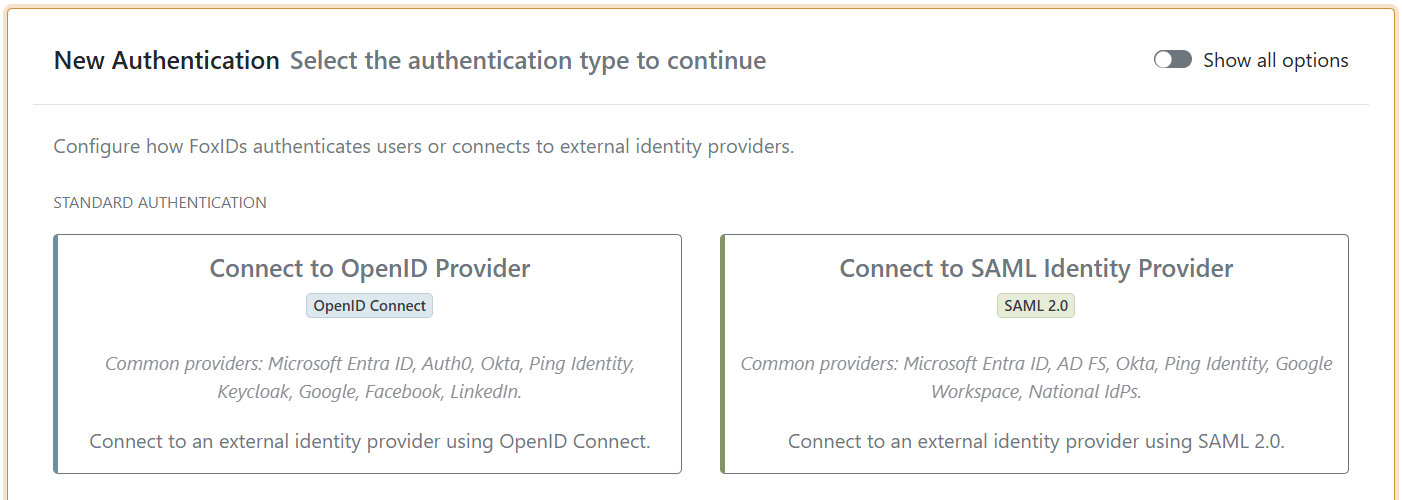
- Open Authentication and click Add authentication.
- Select Connect to OpenID Provider. This standard authentication type is shown without enabling Show all options.
- Configure the provider and click Create.
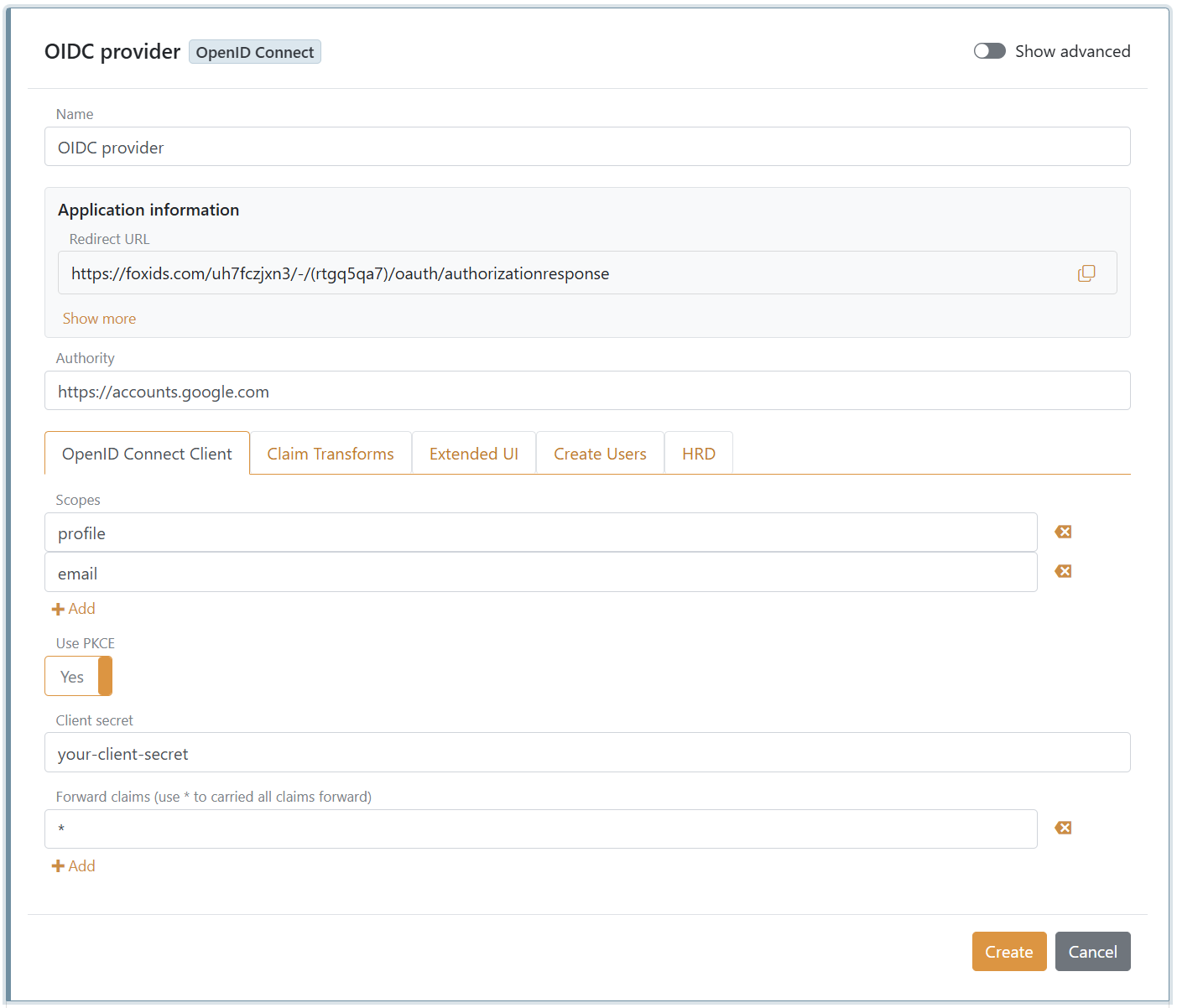
Google example
This example connects to Google using the authority:
https://accounts.google.com
Configure the authentication method with:
- A descriptive Name.
- Google's authority in Authority.
- The scopes
profileandemail. FoxIDs automatically includes the requiredopenidscope. - Use PKCE enabled.
- The client secret issued by Google.
*in Forward claims to forward all received claims.- Read claims from the ID token instead of the access token enabled under Show advanced.
The required scopes and whether additional scopes are needed vary between providers. Configure only the scopes required by the external provider and the user information your applications need.
Copy the Redirect URL shown by FoxIDs and register it as an authorised redirect URI at the external provider. Google also issues a client ID for the OAuth client. Enable Show advanced and enter this value in Optional custom SP client ID. If no custom client ID is configured, FoxIDs uses the authentication method name as the client ID.
Discovery and automatic updates
When the authentication method is created, FoxIDs reads the provider's OpenID Connect discovery document at:
https://accounts.google.com/.well-known/openid-configuration
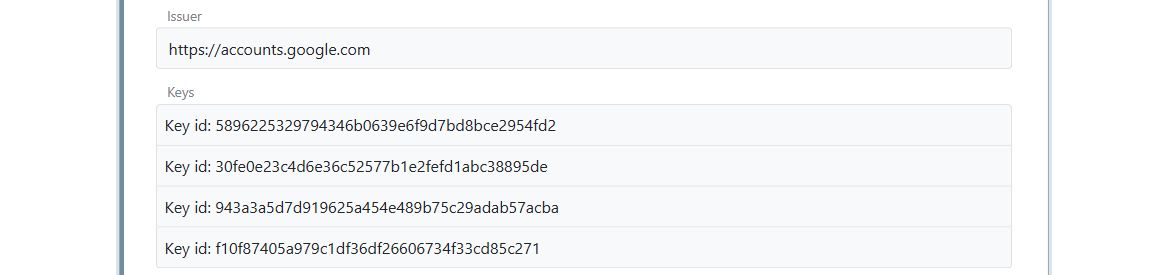
FoxIDs reads the issuer, signing keys and supported endpoints, including the authorisation, token, UserInfo and end-session endpoints when they are present. Reopen the authentication method to inspect the discovered issuer, keys and endpoints.
FoxIDs periodically reads discovery again and applies future endpoint and signing-key changes. If discovery remains unavailable and automatic updates stop, update the authentication method in FoxIDs Control or through the Control API to restart them. The update interval can be changed under Show advanced.
FoxIDs Control creates automatically updated authentication methods from discovery. The Control API additionally supports manually maintained configurations where the issuer, keys and endpoints are supplied directly and discovery is not called.
Claims and forwarding
By default, FoxIDs validates the ID token and reads the user's claims from the external access token. Under Show advanced, the claim source can instead be changed to:
- Read claims from the ID token instead of the access token.
- Read claims from the UserInfo Endpoint instead of the access token or ID token.
The UserInfo option uses the external access token to call the discovered UserInfo endpoint. The two alternatives are mutually exclusive in FoxIDs Control.

The authentication method forwards the default claims and claims listed under Forward claims to application registrations. Add * to forward every received claim; this is the default. The default transferred claims are sub, sid, acr and amr.
Add access_token to make the external access token available to application registrations. If the external provider returns a refresh token, add refresh_token to forward it as well. A refresh token is typically returned only when using Authorization Code Flow and the provider-specific scope required for offline access, such as offline_access.
Claims can be selected, renamed, combined or otherwise changed with claim transforms and claim tasks. A claim created by a transform remains local to the authentication method unless it is included in Forward claims or * is used.
Client authentication and PKCE
The authentication method uses Authorization Code Flow with PKCE by default. The default token-endpoint client authentication method is client secret post.
Enable Show advanced to select client secret basic or private key JWT. With private key JWT, import the client certificate after creating the authentication method and register the corresponding public key with the external provider.

The provider determines which client authentication methods and PKCE options are supported. Use the strongest mutually supported configuration.
Profiles
Profiles let one OpenID Connect authentication method expose alternative sign-in variants without duplicating the complete provider configuration. A profile keeps the authentication method's base settings and can:
- Add provider-specific scopes to the scopes configured on the authentication method.
- Add authorization request parameters, or replace additional parameters with the same name configured on the authentication method.
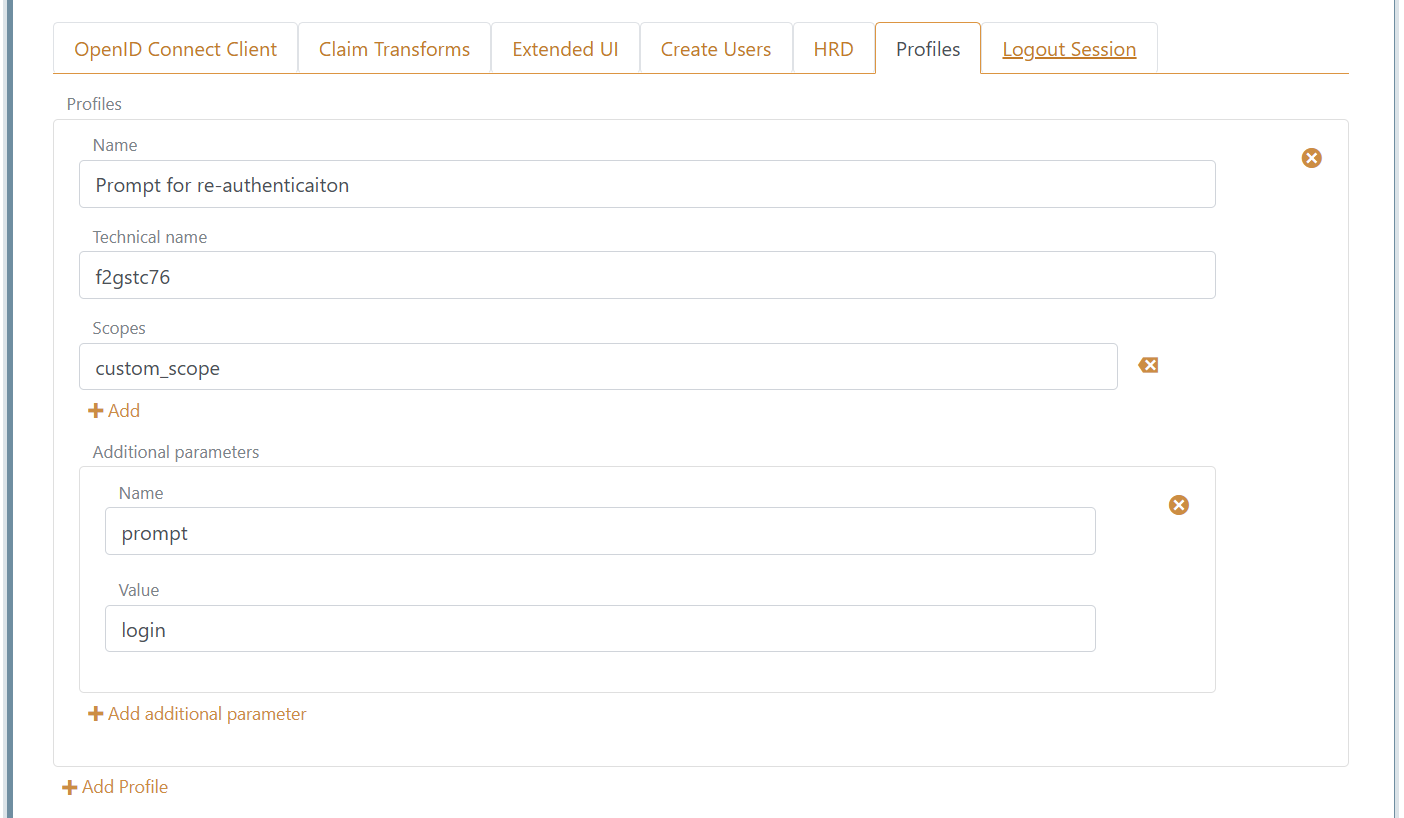
Open the authentication method, enable Show advanced, select the Profiles tab, and click Add Profile. Give the profile a descriptive Name and a unique Technical name, then configure any additional scopes and parameters.
The example below adds prompt=login, which asks the external OpenID Provider to authenticate the user again. The custom_scope value demonstrates where a provider-specific scope can be added; replace it with a scope supported by the provider or omit it when no additional scope is required.
In an application registration, the authentication method itself and each authentication method profile are available as separate selections. You can allow the base authentication method, one or more profiles, or both. When the base method is selected, no profile settings are applied; when a profile is selected, FoxIDs combines its scopes and additional parameters with the base configuration.
Advanced provider settings
The following settings are available under Show advanced:
- Optional custom SP client ID overrides the authentication method name used as the client ID. Use it when the provider issues or requires a specific client ID.
- Edit issuers replaces the issuer obtained from discovery with an explicit list. This supports providers that issue tokens from multiple issuers using the same signing keys.
*accepts any issuer and should only be used when that trust is intentional. The accepted issuer is added to theauth_method_issuerclaim. - Party binding pattern changes the FoxIDs callback URL format for provider interoperability. FoxIDs uses the brackets pattern
.../(auth-method)/...by default; tildes.../~auth-method~/...and dot.../.auth-method./...patterns are also supported. - Response type, response mode, discovery update interval, logout and trust settings provide additional protocol control.
The issuer and signing keys shown after creation remain read-only while the discovered issuer is used. Enable Edit issuers only when the provider requires an issuer configuration that differs from discovery.
How-to guides
- Connect IdentityServer
- Connect Microsoft Entra ID
- Connect Azure AD B2C
- Connect Amazon Cognito
- Connect Google
- Connect Facebook
- Connect Signicat
- Connect Nets eID Broker