Users
Users are saved in the environment's user repository. To achieve multiple user stores, you create additional environments and thus achieve more user stores.
There are two different types of users:
- Internal users which are authenticated using the login authentication method.
- External users which are linked by an authentication method to an external user/identity with a claim. The users are authenticated in an external Identity Provider and can be redeemed based on e.g. an
emailclaim (see Provision and redeem section in external users doc).
You can use Directory Connector when internal users should exist in the FoxIDs environment, but password authentication and password lifecycle should be delegated to an authoritative external directory.
Another option is to authenticate against an existing external user store via an API. In this case the users are not saved as internal users in the environment. The users can optionally be created as external users.
You can also model hierarchical access for both internal and external users with access structure and assign memberships to access structure nodes.
Revoking refresh tokens and active sessions
FoxIDs automatically revokes a user's refresh token grants and active sessions when an internal or external user is disabled or deleted. The same applies when an expired external user is removed. Authorization codes are not revoked because they are short-lived and can only be used once.
Changes to access structure memberships also revoke affected refresh token grants and active sessions. This happens when a user's memberships are changed or when an access structure starts disabling users or is deleted. Time-limited memberships are checked when a refresh token or active session is used, ensuring that expired or removed access cannot continue to be used.
In the FoxIDs Control Client, use the Refresh Token Grants and Active Sessions tabs on the environment's users page to find and revoke access. You can search using a FoxIDs user ID, email, phone number, username or sub. Federated users who are not saved in FoxIDs can be found using the identifiers available for them. Additional filters let you narrow the results to a particular authentication method, application or session.
Revoking an active session also revokes refresh token grants associated with that session and matching the selected filters. Active session details show the name and type of the authentication method that created the session.
Deleting an environment removes its active sessions and refresh token grants. Deleting a tenant removes the same data from all of its environments.
Refresh token grants have a maximum inactivity lifetime and absolute lifetime of one year. Each refresh uses the application's current lifetime settings, including changes made after the grant was issued. The absolute lifetime is measured from the grant's original creation; renewal and token rotation preserve that starting point. Each successful refresh renews the inactivity lifetime within the absolute limit. A grant that has reached its absolute lifetime is rejected and deleted when used.
When a refresh token is issued or renewed, FoxIDs retains its associated active session for the token's current remaining lifetime. If several refresh token grants share a session, the session is retained for the latest required expiry. Signing in through FoxIDs with an existing user session can extend the active session according to the authentication method's session settings, without renewing the refresh token grant. Refresh-token activity does not extend the user's browser sign-in session. The active session can remain available for refresh tokens after the browser sign-in session expires. Explicit revocation invalidates the session and its associated grants.
Failing login lockout
FoxIDs counts failed sign-in attempts for each user identifier and failure type. When the failed login attempt limit is reached within the configured timeframe, further attempts are blocked for the lockout period. The user is automatically unlocked when that period ends.
Directory Connector uses the same settings to limit how many times a user can enter an email address, phone number or username in one login sequence. All identifiers entered in that sequence share the limit. When the limit is reached, the user must wait for the lockout period to end or start a new login sequence.
Lockout is enforced for user authentication using the login and external login authentication methods, including password, one-time code, and MFA verification failures.
This security feature helps prevent brute-force attacks on user accounts. Configure the attempt limit, attempt timeframe, and lockout period to suit your security requirements.
In the FoxIDs Control Client, select your environment and open Users > Failing Login Lockout to view active lockouts. Select End lockout to remove a lockout before it expires.
The lockout is configured in the environment settings in the FoxIDs Control Client.
- Select the Settings tab.
- Select the Environment tab.
- Find the Failing login lockout section.
- Set the Failed login attempt limit, e.g.
5attempts. - Set the Failed login attempt timeframe in seconds, e.g.
36000for 10 hours. - Set the Lockout period in seconds, e.g.
3600for 60 minutes.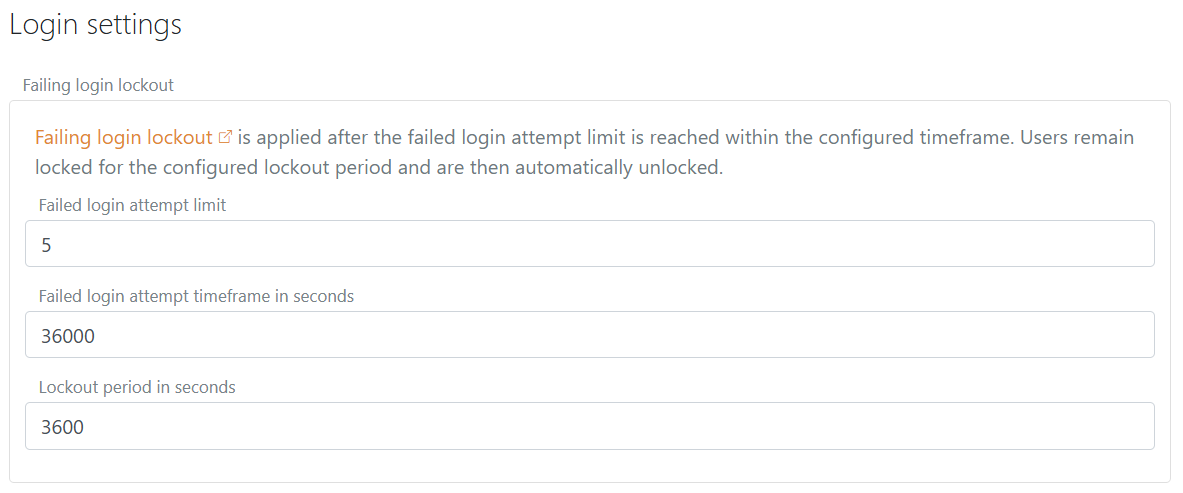
- Click Update.