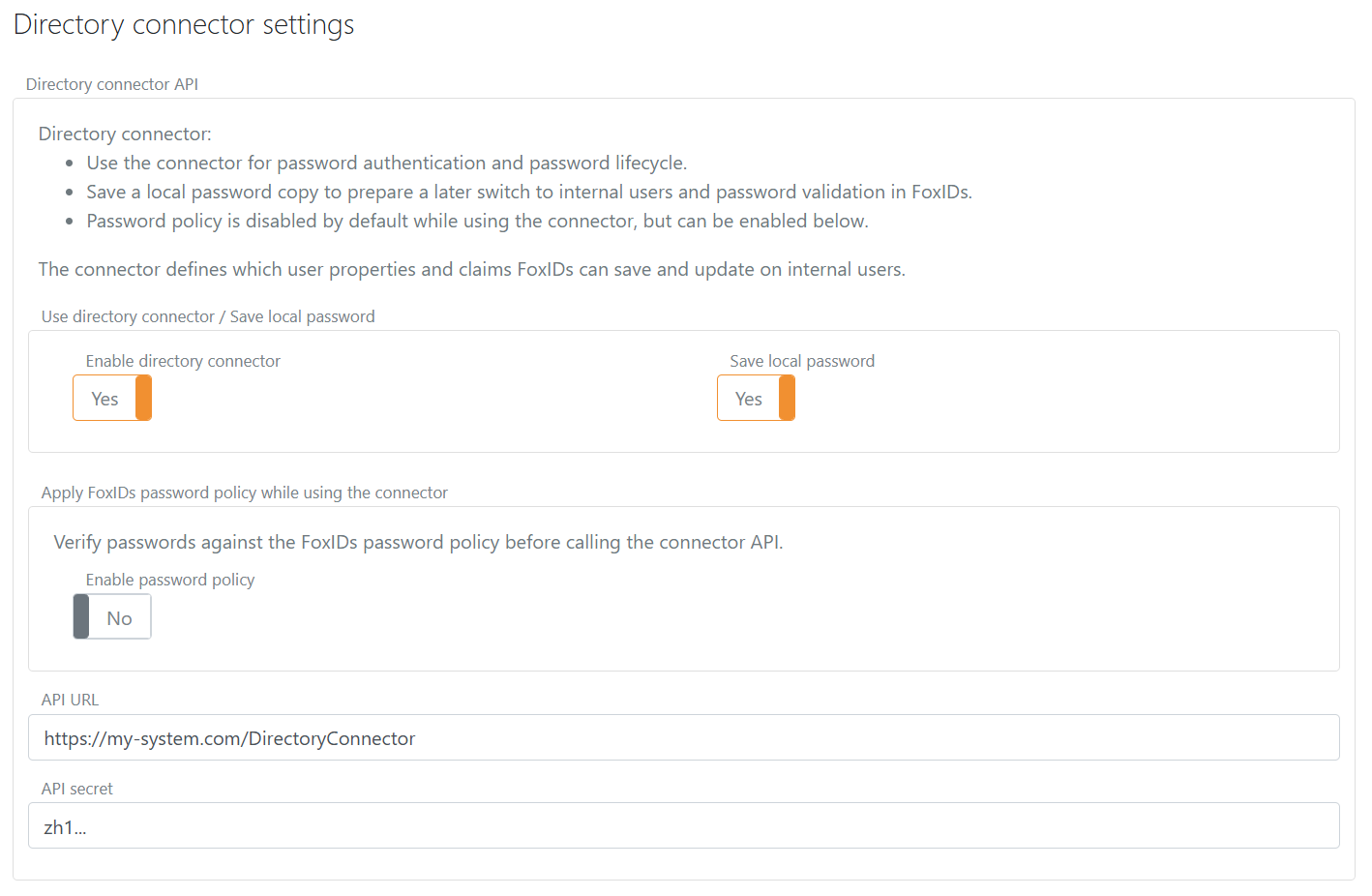
Directory Connector
Directory Connector lets FoxIDs use an external directory as the authoritative source for internal users' passwords and selected user data.
The users still exist as internal users in the FoxIDs environment. During password authentication and password lifecycle operations, FoxIDs calls the Directory Connector API instead of validating the password only against the internal FoxIDs user.
Because FoxIDs keeps an internal user record, FoxIDs multi-factor authentication (MFA) handling can be added to users from the external repository. The connector can return MFA-related user settings, such as requireMultiFactor and disabled two-factor methods, and FoxIDs applies those settings to the internal user while the external repository remains authoritative for passwords and selected user data.
For Active Directory, FoxIDs includes an IIS-deployable Directory Connector for Active Directory component.
Use Directory Connector when:
- You want users to sign in with the normal login authentication method.
- You want to enable users from an existing directory for OpenID Connect and SAML 2.0 applications through FoxIDs.
- Your external directory is authoritative for password validation and password changes.
- You want FoxIDs to keep an internal user record with identifiers, properties, claims, multi-factor authentication (MFA) settings, access assignments, and optionally a local password copy.
- You want a path to later switch to internal users and password validation in FoxIDs without forcing all users through a password reset.
There is one Directory Connector per environment. When it is enabled, it applies at the environment level.
How it works
When a user signs in with username and password, FoxIDs calls the Directory Connector API.
On successful validation, FoxIDs creates or updates the internal user in the environment based on the API response. The response must include a stable directoryUserId, which is stored on the internal user and used to bind the FoxIDs user to the external directory user.
The directoryUserId is not a user identifier known by the end user. It is a separate stable external directory ID. Do not use email, phone, or username as the directoryUserId because those values can change. The value must be stable and unique in the external directory.
If FoxIDs already knows the internal user's directoryUserId, it is sent in the Directory Connector request together with exactly one of the user's email, phone, or username. This lets the external directory identify the user even if an identifier has changed.
If the Directory Connector API validates the user successfully, FoxIDs updates the internal user with identifiers, selected properties, and claims returned by the API.
If the connector reports that the user is disabled or deleted, FoxIDs will disable or delete the internal user in the environment.
Local password copy
The external directory is authoritative while Directory Connector is enabled. FoxIDs does not fall back to the local password hash if the Directory Connector API is temporarily unavailable.
By default, FoxIDs saves a local password copy on the internal user after a successful connector password validation or password lifecycle operation. This can be disabled in the environment settings.
The local password copy is not used while Directory Connector is enabled. It exists to support a later switch to internal users and password validation in FoxIDs without forcing all users through a password reset.
Password lifecycle
User creation and password lifecycle operations are delegated to the Directory Connector API:
- Password authentication calls the
authenticationendpoint. - Login create-user flow calls the
create-userendpoint. - User password change calls the
change-passwordendpoint. - Set-password and reset-password flows call the
set-passwordendpoint.
FoxIDs normally calls password lifecycle endpoints when the internal user is known and has a directoryUserId. The exception is change-password during first login when the external directory has returned password_expired before FoxIDs has created the internal user. In that case FoxIDs sends the login identifier and current password without directoryUserId; after a successful password change, FoxIDs uses the success response to create the internal user and store the returned directoryUserId.
FoxIDs does not update its internal password history when Directory Connector is used, because FoxIDs does not necessarily know about all password changes in the external directory.
Password policy and error messages
The external directory enforces the password policy. FoxIDs uses the environment password policy when it shows password-policy error messages returned from the connector.
Configure the environment password policy to match the external directory password policy. If they do not match, users can see password guidance that does not reflect the actual external directory requirements.
For example, if the external directory rejects a password because it is too short, FoxIDs uses the environment password minimum length when rendering the error message.
Implement API
You implement a Directory Connector API and configure FoxIDs with its base URL and secret.
The API has a base URL and four endpoints:
authenticationvalidates a user's current password.create-usercreates a new user in the external directory and returns the created user.change-passwordvalidates the current password and changes it to a new password.set-passwordsets a new password without validating the current password.
If the base URL is https://somewhere.org/directory, the endpoints are:
https://somewhere.org/directory/authenticationhttps://somewhere.org/directory/create-userhttps://somewhere.org/directory/change-passwordhttps://somewhere.org/directory/set-password
FoxIDs Cloud calls your API from IP
57.128.60.142.
IP(s) can change or be expanded.
Security
Requests are secured with HTTP Basic authentication:
- Username:
directory_connector - Password: the configured API secret
The call is HTTP POST with a JSON body.
FoxIDs sends the selected language in the Accept-Language request header, for example Accept-Language: da-DK. In a login flow, this follows the language selected by ui_locales or the browser, with English as the FoxIDs fallback. The API can use this header to localise user-facing messages and must choose its own fallback if it does not support the requested language. This header is sent to all four endpoints.
Authentication request
The authentication endpoint receives the user's password and exactly one user identifier. FoxIDs sends directoryUserId if the internal user exists and the value is known.
{
  "directoryUserId": "a1b2c3d4",
  "email": "user1@somewhere.org",
  "password": "testpass1"
}
Fields:
directoryUserIdis optional. FoxIDs sends it when the internal user exists and the value is known.- Exactly one of
email,phone, orusernameis sent. passwordis required.
FoxIDs selects the identifier from the user's login input and the enabled identifier settings. For example, if only username is enabled and the user enters user1@somewhere.org, FoxIDs sends it as username. FoxIDs removes surrounding whitespace before sending the username to the connector.
Create-user request
The create-user endpoint receives exactly one user identifier, a required password, selected create-user properties, and claims collected during the FoxIDs create-user flow.
{
  "email": "user1@somewhere.org",
  "password": "testpass1",
  "confirmAccount": true,
  "requireMultiFactor": false,
  "claims": [
    { "type": "given_name", "value": "User" },
    { "type": "family_name", "value": "One" }
  ]
}
Fields:
- Exactly one of
email,phone, orusernameis sent. passwordis required. Passwordless create-user is not supported with Directory Connector because the Directory Connector API authenticates users with a password.confirmAccountandrequireMultiFactorare the requested FoxIDs create-user settings.claimscontains the non-identifier claims collected during the FoxIDs create-user flow.
On success, return a normal success response. FoxIDs stores the returned directoryUserId on the internal user created after the external directory user has been created.
Change-password request
The change-password endpoint receives exactly one user identifier, current password, and new password. FoxIDs sends directoryUserId when the internal user exists and the value is known.
{
  "directoryUserId": "a1b2c3d4",
  "email": "user1@somewhere.org",
  "currentPassword": "oldpass1",
  "newPassword": "newpass1"
}
Fields:
directoryUserIdis optional. FoxIDs sends it when the internal user exists and the value is known. It can be omitted during first login if the external directory requires a password change before FoxIDs has created the internal user.- Exactly one of
email,phone, orusernameis sent. currentPasswordandnewPasswordare required.
Set-password request
The set-password endpoint receives the user's stable directory binding, exactly one user identifier, and new password.
{
  "directoryUserId": "a1b2c3d4",
  "email": "user1@somewhere.org",
  "password": "newpass1"
}
Fields:
directoryUserIdis sent and should be used as the stable directory binding.- Exactly one of
email,phone, orusernameis sent. FoxIDs selects the first available internal user identifier in this order: email, phone, username. passwordis required.
Success response
On success, the API must return HTTP status code 200 and a user response.
{
  "directoryUserId": "a1b2c3d4",
  "email": "user1@somewhere.org",
  "phone": "+4511223344",
  "username": "user1",
  "confirmAccount": true,
  "emailVerified": true,
  "phoneVerified": true,
  "disableTwoFactorApp": false,
  "disableTwoFactorSms": false,
  "disableTwoFactorEmail": false,
  "requireMultiFactor": false,
  "claims": [
    { "type": "name", "value": "User One" },
    { "type": "role", "value": "employee" }
  ]
}
FoxIDs uses the response to create or update the internal user in the environment.
Fields:
directoryUserIdis required. It must be stable and unique in the external directory and is stored on the internal FoxIDs user.email,phone, andusernameare optional individually, but at least one must be present. FoxIDs stores the returned values as the internal user's identifiers. Returned user identifier values must uniquely identify a single user in the external directory used by the connector.phonemust include the country calling code in international format, for example+4511223344.confirmAccountcontrols whether FoxIDs should run a confirmation flow to confirm the internal user.emailVerifiedcontrols whether the internal user's email is marked as verified.phoneVerifiedcontrols whether the internal user's phone number is marked as verified.disableTwoFactorAppdisables authenticator app two-factor authentication for the internal user.disableTwoFactorSmsdisables SMS two-factor authentication for the internal user.disableTwoFactorEmaildisables email two-factor authentication for the internal user.requireMultiFactorcontrols whether the internal user must use multi-factor authentication.claimsis optional. FoxIDs stores the returned claims on the internal user.
FoxIDs ignores claims with a missing, null, empty or whitespace-only type or value. With trace message logging enabled, the response trace includes the received claims before they are filtered. Long trace messages are truncated.
Error response
If Basic authentication is rejected, return HTTP status code 401 and invalid_api_id_secret.
{
  "error": "invalid_api_id_secret",
  "errorMessage": "Invalid API ID or secret."
}
If the user does not exist when calling the authentication endpoint without a directoryUserId, return HTTP status code 400, 401, or 403 and user_not_exists.
{
  "error": "user_not_exists",
  "errorMessage": "User not found."
}
If the password is rejected by the authentication endpoint, return HTTP status code 400, 401, or 403 and invalid_password.
{
  "error": "invalid_password",
  "errorMessage": "Invalid password."
}
If the user identifier and password are valid but login is rejected for another reason, return HTTP status code 400, 401, or 403 and login_rejected from authentication. It is supported with or without directoryUserId. The optional uiErrorMessage is shown as plain text on the login form. The API supplies the translated message using Accept-Language.
{
  "error": "login_rejected",
  "errorMessage": "Credentials verified; login rejected by directory policy.",
  "uiErrorMessage": "You cannot log in here. Contact support."
}
If uiErrorMessage is omitted, null, empty or contains only whitespace, FoxIDs shows the same localised general login message as for invalid_password, user_not_exists, user_disabled and user_deleted. A rejected login counts towards the existing protection against repeated failed login attempts. It does not create, update, disable or delete the internal user.
If the current password is rejected by the change-password endpoint, return HTTP status code 400, 401, or 403 and invalid_current_password.
{
  "error": "invalid_current_password",
  "errorMessage": "Invalid current password."
}
The errorMessage field is diagnostic text for the FoxIDs logs and is not shown to the end user. Include the reason for the failure, but never include passwords, API secrets or private keys.
FoxIDs displays a returned uiErrorMessage only for login_rejected. For other supported error codes, FoxIDs selects the user-facing message from its own localised text resources. Diagnostic errorMessage text is never used as a fallback for a user-facing message.
Supported error codes by endpoint:
| Error code | authentication |
create-user |
change-password |
set-password |
Meaning |
|---|---|---|---|---|---|
invalid_api_id_secret |
Yes | Yes | Yes | Yes | The HTTP Basic API username or secret is invalid. |
user_exists |
No | Yes | No | No | A user with the supplied identifier already exists in the external directory. |
user_not_exists |
Yes, without directoryUserId |
No | Yes, without directoryUserId |
No | No external directory user matched the supplied user identifiers. |
invalid_password |
Yes | No | No | No | The password in an authentication request was rejected by the directory. |
login_rejected |
Yes | No | No | No | Login was rejected after verifying the user identifier and password. An optional uiErrorMessage is shown on the login form. |
invalid_current_password |
No | No | Yes | No | The current password in a change-password request was rejected by the directory. |
create_user_not_supported |
No | Yes | No | No | The connector does not support creating users in the external directory. |
user_disabled |
Yes | No | Yes | Yes | The user exists in the directory but is disabled. FoxIDs will disable the internal user. |
user_deleted |
Yes, with directoryUserId |
No | Yes, with directoryUserId |
Yes, with directoryUserId |
The external directory user linked by directoryUserId no longer exists or is deleted. FoxIDs will delete the internal user. |
password_not_accepted |
Yes | Yes | Yes | Yes | The password being authenticated, used for create-user, changed, or set was rejected by a directory password rule that does not map to a more specific code. |
password_min_length |
Yes | Yes | Yes | Yes | The password being authenticated, used for create-user, changed, or set is shorter than the directory password minimum length. |
password_max_length |
Yes | Yes | Yes | Yes | The password being authenticated, used for create-user, changed, or set is longer than the directory password maximum length. |
password_banned_characters |
Yes | Yes | Yes | Yes | The password being authenticated, used for create-user, changed, or set contains one or more characters or words rejected by the directory. |
password_complexity |
Yes | Yes | Yes | Yes | Legacy character-complexity error interpreted by FoxIDs as password_character_variation. Use one of the two specific character error codes for new integrations. |
password_character_repeat |
Yes | Yes | Yes | Yes | The password being authenticated, used for create-user, changed, or set contains excessive character repetition. |
password_character_variation |
Yes | Yes | Yes | Yes | The password being authenticated, used for create-user, changed, or set does not contain sufficient character variation. |
password_email_text_complexity |
Yes | Yes | Yes | Yes | The password being authenticated, used for create-user, changed, or set contains the user's email or part of it. |
password_phone_text_complexity |
Yes | Yes | Yes | Yes | The password being authenticated, used for create-user, changed, or set contains the user's phone number or part of it. |
password_username_text_complexity |
Yes | Yes | Yes | Yes | The password being authenticated, used for create-user, changed, or set contains the user's username or part of it. |
password_url_text_complexity |
Yes | Yes | Yes | Yes | The password being authenticated, used for create-user, changed, or set contains text related to the FoxIDs URL. |
password_risk |
Yes | Yes | Yes | Yes | The password being authenticated, used for create-user, changed, or set is known to be risky, compromised, or otherwise unsafe. |
password_history |
Yes | Yes | Yes | Yes | The password being authenticated, used for create-user, changed, or set was rejected because it has been used before. |
password_expired |
Yes | Yes | Yes | Yes | The password being authenticated, used for create-user, changed, or set is expired and must be changed before authentication can continue. |
new_password_equals_current |
No | No | Yes | No | The new password is the same as the current password. set-password cannot return this error because it does not receive the current password. |
For password-policy errors, FoxIDs uses the environment password policy to show the user-facing error message. See Password policy and error messages.
Return only an error code supported by the endpoint and the supplied directoryUserId, as listed above. An unsupported code, malformed response or unexpected HTTP status is an integration failure and leads to the generic error page. For a technical failure in the connector, return HTTP status code 500. See Troubleshooting browser errors to find the diagnostic details using the identifiers on the error page.
Authentication errors and user privacy
An unauthenticated caller must not be able to determine whether a username or email address exists from a login failure. During password authentication, FoxIDs handles the supported errors as follows:
| Connector error | User-facing result |
|---|---|
invalid_password, user_not_exists, user_disabled or user_deleted |
The same general login message, such as Wrong email or password., translated into the active language and adapted to the enabled login identifiers. |
login_rejected |
The supplied uiErrorMessage, or the same general login message if it is missing or blank, in the same place on the login form. |
password_not_accepted |
The password-change page with general password-policy guidance. |
password_expired or another specific password-policy error |
The password-change page with the corresponding localised password-policy guidance. |
The connector must verify the supplied current password before returning a password-policy error from authentication. Otherwise, a different page or message can let an attacker discover users and confirm their identifiers by guessing usernames or email addresses. For change-password, verify the current password before returning account-specific guidance about the new password. General format checks must not disclose whether an account exists.
If a user is not allowed to log in through this login flow for any reason, first validate the supplied user identifier and password. Only return a rejection based on this restriction after successfully verifying both, so that the restriction cannot reveal whether a guessed identifier belongs to a real user. Return login_rejected from authentication, put the diagnostic reason in errorMessage and optionally provide safe user guidance in uiErrorMessage. If the credentials cannot be verified, return the normal authentication failure without disclosing the restriction.
FoxIDs relies on the connector to verify the credentials before returning login_rejected; a successful account lookup or knowledge of directoryUserId is not sufficient. Before credentials have been verified, show any instructions or buttons for alternative login methods independently of whether the submitted identifier matches an account.
Use user_disabled and user_deleted only to report the corresponding directory account state. They also disable or delete the internal user and revoke its access; they are not general login-rejection codes.
Keep failure handling consistent across known and unknown identifiers, including observable response timing and protection against repeated attempts. A generic message alone does not prevent account discovery if a different redirect, status or response time reveals the result. Follow the OWASP authentication error guidance when implementing the connector.
API sample
The sample DirectoryConnectorApiSample shows how to implement the Directory Connector API in ASP.NET Core.
The sample includes:
- The
authentication,create-user,change-password, andset-passwordendpoints. - HTTP Basic authentication with API username
directory_connector. - A small in-memory directory with demo users and stable
directoryUserIdvalues. - Example password-policy errors such as
password_min_length,password_banned_characters, andnew_password_equals_current. - A disabled-user example that returns
user_disabled.
Postman collection directory-connector-api.postman_collection.json can be used to call and test the sample API with Postman.
Active Directory component
FoxIDs includes an IIS-deployable Directory Connector for Active Directory component. The component implements the Directory Connector API for one AD/LDAP domain and can validate passwords, change passwords, set passwords, return configured AD attributes as claims, and return configured nested AD group memberships as claims.
Configure
Configure Directory Connector in the environment settings in the FoxIDs Control Client.
- Select the Settings tab.
- Select the Environment tab.
- Find the Directory Connector section.
- Enable Directory Connector.
- Add the base API URL without the endpoint folder in API URL.
- Add the API secret.
- Decide whether to save a local password copy.
- Configure the environment password policy to match the external directory password policy.
- Click Update.