Claim transforms and claim tasks
Each FoxIDs authentication method and application registration handles claims and supports claim transformations and claim tasks. This means that multiple sets of claim transforms and claim tasks can be executed for each user authentication. First, claim transforms and claim tasks are executed on the authentication method, and then on the application registration.
Additional subsets of claim transforms and claim tasks can be performed if a user or an external user is created.

In authentication methods with a Forward claims list, add ordinary claims created by first-level transforms to that list to make them available to subsequent steps, or include * (default). Login authentication methods carry these claims forward without this list.
The reserved prefixes _local:, _internal:, _session: and _impersonate: determine how claims are used during authentication. See Local, internal and session claims for their different lifetimes.
To issue an ordinary claim from an application registration, add the claim or * to the Issue claims list. Alternatively, for OpenID Connect, add the claim to a scope's Voluntary claims list and request the scope from your application. Reserved claims are not issued, even with *.
Please see the claim transform examples.
Enable
Log claim tracein the log settings to see the claims before and after transformation in the logs.
Claim transforms can be configured in a login authentication method.
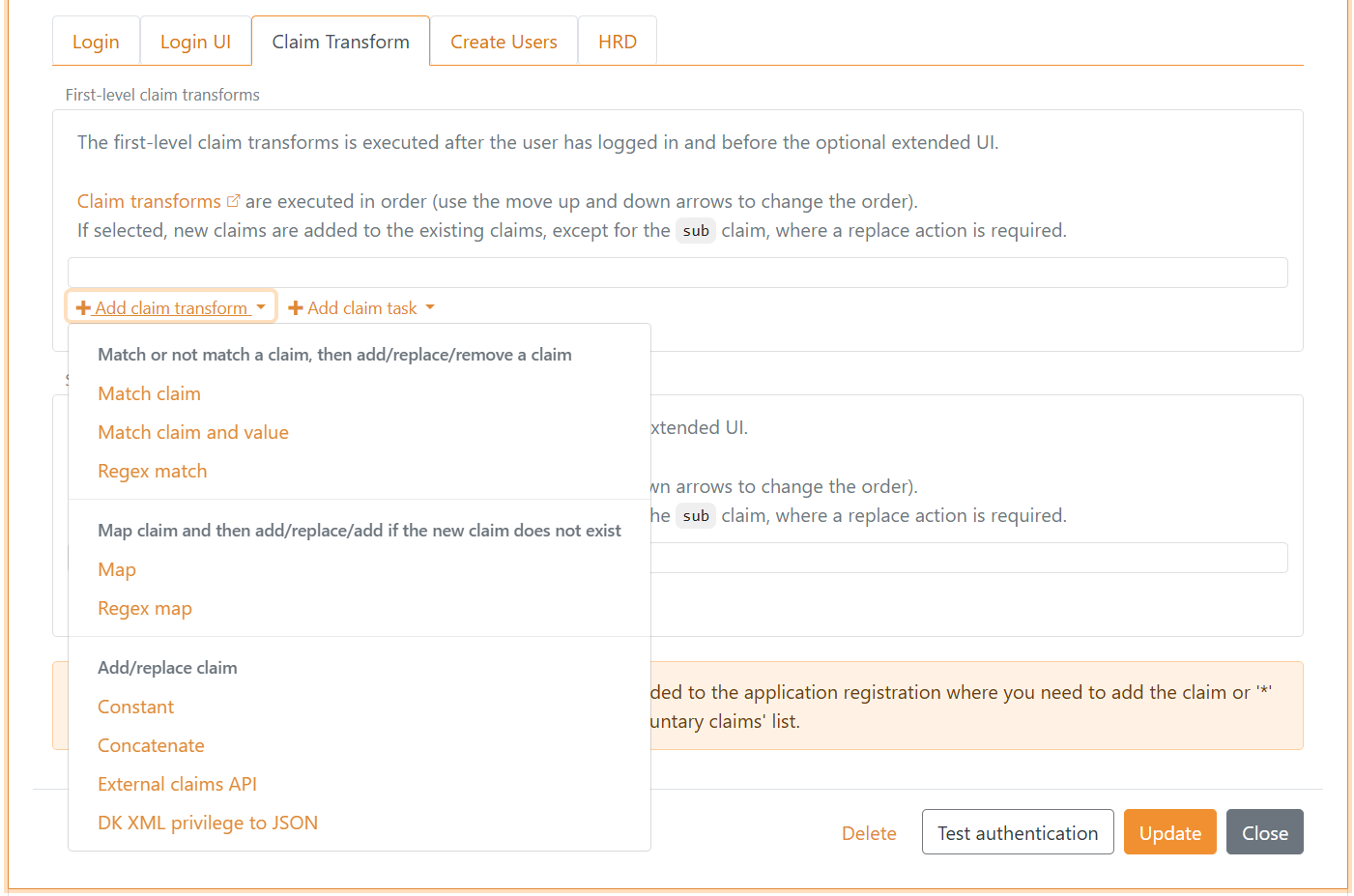
And claim tasks.
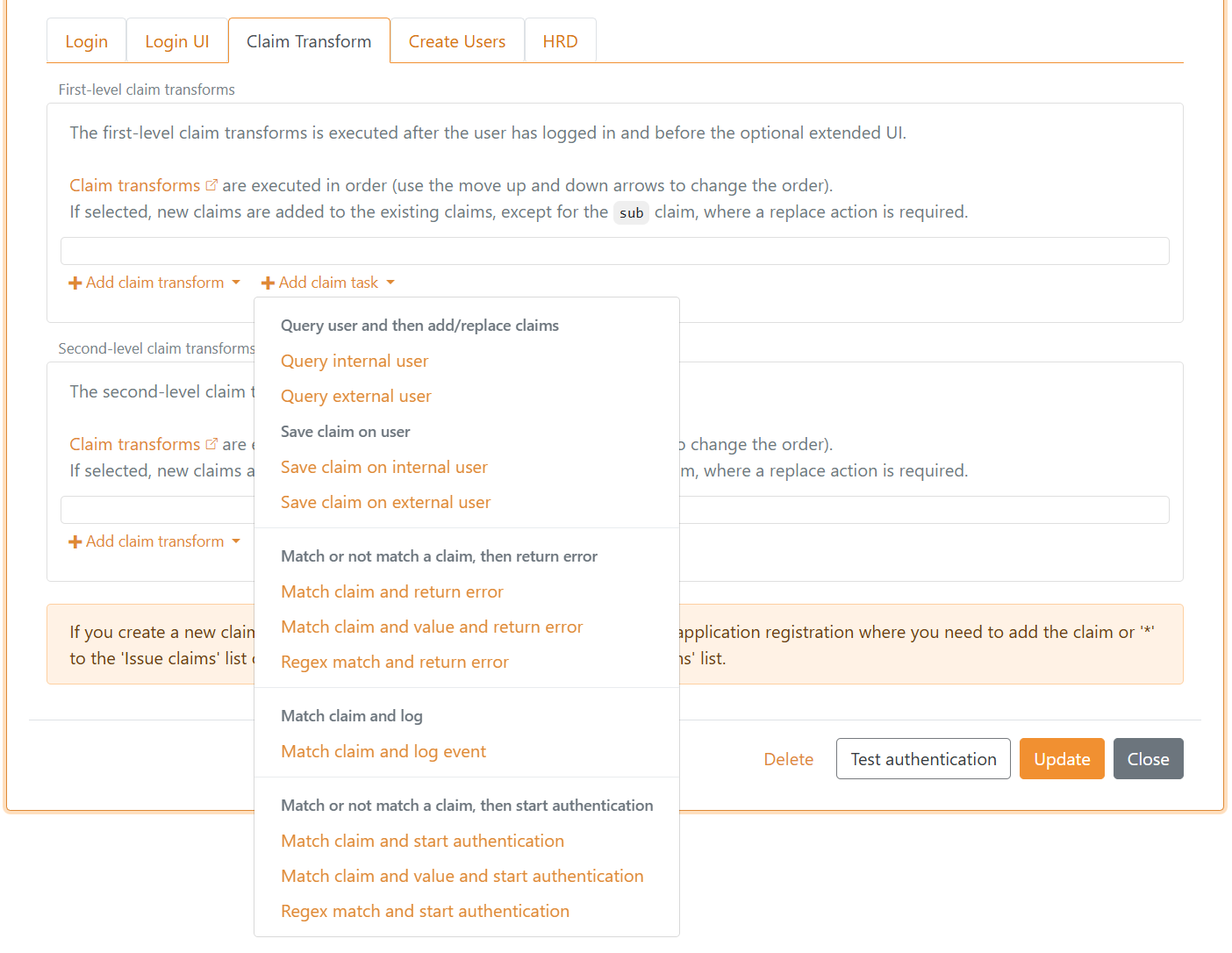
Similarly, claim transforms and claim tasks can be configured as first-level and second-level in an OpenID Connect authentication method.
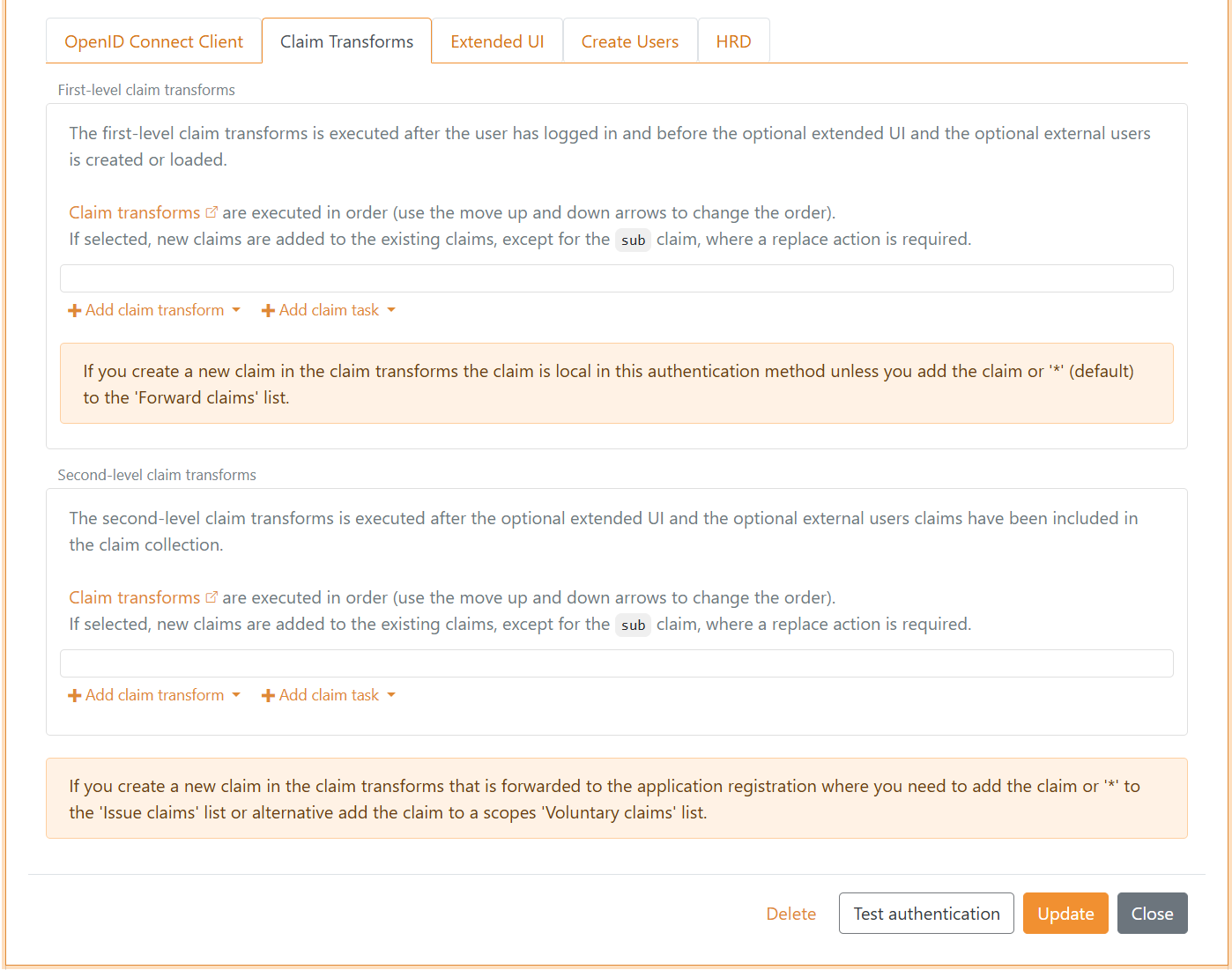
Claims are by default represented as JWT claims. If the authentication method is SAML 2.0, the first-level claims are represented as SAML 2.0 claims. If the application registration is SAML 2.0, the claims are represented as SAML 2.0 claims.
A claim transform and claim task will do one of up to seven different actions depending on the particular claim transform or claim task type.
Claim transform and claim task actions:
Add claim- add a new claimAdd claim, if not match- do the add action if the condition does not matchReplace claim- add a new claim and remove existing claims if one or more existReplace claim, if not match- do the replace action if the condition does not matchRemove claim- remove the claims if one or more existIf match- do the action if the condition matchesIf not match- do the action if the condition does not match
Claim transforms and claim tasks are executed in order, and the actions are therefore executed in order. This means that it is possible to create a local variable by adding a claim and later in the sequence make decisions based on the claim.
A claim is local in the claim transforms and claim tasks set if it starts with _local:.
When claim transforms and claim tasks run in a login flow, FoxIDs automatically adds local claims from the login request before executing the transformations. These _local: claims are intended for decisions inside the transform/task sequence and are removed from the output.
General local claims added from the login request:
_local:login_action- the login request action, stored as camelCase_local:user_id- the login request user ID (only if provided)_local:max_age- the login request max age (only if set and greater than 0)_local:login_hint- the login request hint (only if provided)_local:acr- the login request ACR values as a space-delimited list (only if provided)_local:params:{name}- an allowed application request parameter, with the parameter name in lowercase and one claim per value (only if supplied)
When an authentication method is used as an Advanced MFA item, that authentication method's own claim transforms receive the following local claims for the user already authenticated by the Login authentication method:
| Claim | Value |
|---|---|
_local:mfa:user_id |
The user's stable technical FoxIDs user ID. |
_local:mfa:user_identifier |
The identifier used for the Login authentication. If no identifier was supplied, FoxIDs uses the user's email, phone number or username. |
_local:mfa:username |
The user's registered username. |
_local:mfa:email |
The user's registered email, or the value of the user's email claim if the registered email is empty. |
_local:mfa:phone |
The user's registered phone number, or the value of the user's phone_number claim if the registered phone number is empty. |
Only claims with a non-empty value are added. These transforms operate on the claims returned by the external identity provider and can add the AMR value required by the MFA item. The Login MFA flow uses the transformed response to validate that AMR value. Other claims returned by the authentication method are not merged into the Login authentication method's claims or passed to the Login authentication method's general claim transforms.
With the Add claim, if not match action it is possible to add a claim (local variable) if another claim or a claim value does not exist.
Claim transform types that support all actions:
Match claim- checks whether the selected claim type exists. For add and replace actions, the outgoing claim is written with the new value when the claim exists. Theif not matchactions run when the claim is missing. A remove action removes the selected outgoing claim when the claim exists.Match claim and value- checks whether the selected claim type exists with the configured value. For add and replace actions, the outgoing claim is written with the new value when both the claim type and value match. Theif not matchactions run when the claim exists but the value does not match. A remove action removes the selected outgoing claim when both the claim type and value match.Regex match- checks whether the selected claim type exists and the claim value matches the configured regular expression. For add and replace actions, the outgoing claim is written with the new value when the regular expression matches. Theif not matchactions run when the claim exists but the value does not match the regular expression. A remove action removes the selected outgoing claim when the regular expression matches.
Claim transform types that support Add claim, Replace claim and Add claim, if new claim does not exist actions:
Map- copies the selected claim value to the outgoing claim. WithAdd claim, if new claim does not exist, the value is only written if the outgoing claim is not already present.Regex map- extracts the named regular expression groupmapfrom the selected claim value and writes the extracted value to the outgoing claim. WithAdd claim, if new claim does not exist, the value is only written if the outgoing claim is not already present.
Claim transform types that support Add claim and Replace claim actions:
Constant- always writes the configured constant value to the outgoing claim.Concatenate- builds the outgoing claim from values in the selected claims. The format string uses placeholders such as{0},{1}and{2}for the selected claim values in order.External claims API- sends selected claims to an external API. Claims returned by the API are added to or replace outgoing claims.Impersonation- prepares a selected local target as the effective user after authentication-method transforms. See Impersonation.DK XML privilege to JSON- converts a DK privilege XML claim to JSON claims, one claim for eachPrivilegeGroupXML element.
Claim task types that support Add claim and Replace claim actions:
Query internal user- uses the lookup claim value to find one internal user, then adds or replaces selected claims from that internal user in the current claim set.Query external user- uses the lookup claim value to find one external user, then adds or replaces selected claims from that external user in the current claim set.Save claim on internal user- uses the lookup claim value to find one internal user, then adds or replaces the selected claim on that internal user with values from the selected update value claim in the current claim set.Save claim on external user- uses the lookup claim value to find one external user, then adds or replaces the selected claim on that external user with values from the selected update value claim in the current claim set.
All four user tasks listed above treat a user as unavailable when the account is disabled directly or through an active Access Structure membership. The user is excluded before FoxIDs determines whether the search found exactly one user, so query tasks add no claims and save tasks make no changes.
When either query user task runs on an authentication method and no local account is already associated with the current authentication response, the first uniquely matched user in claim-transform execution order becomes the response's local account. A Query internal user task with a Target only supplies local claims and leaves this account association unchanged. If the authentication continues through Extended UI steps, FoxIDs retains the selected account's access snapshot in the server-side sequence and uses it when the response completes. FoxIDs then applies the association to active sessions and refresh token grants. An internal or connected external user authenticated directly by the authentication method takes precedence, and an existing association is never replaced by a later query.
If a claim transformation starts another authentication method interactively, the redirected authentication runs as a new login flow. A local account association selected by an earlier query is not carried through that redirect.
Query user tasks on an application registration can add claims but do not create or change the login's local account association.
The query user tasks make the selected user's stable ID available as a local claim:
| Claim task | Local claim | Value |
|---|---|---|
Query internal user |
_local:internal_user_id |
The selected internal user's stable technical FoxIDs user ID. |
Query external user |
_local:external_user_id |
The selected external user's stable technical FoxIDs external user ID. |
Select the local claim explicitly in the task's outgoing claims, or select *, to make it available to subsequent transforms in the same sequence. Local claims are removed from the final output unless their value is mapped to a non-local claim.
For example, after looking up an internal user by email or username, a Match claim and return error task can check _local:internal_user_id and stop the flow if no unique internal user was found. A Match claim transform can instead add another claim only when the lookup succeeds. The stable user ID remains local to the transform sequence while still providing a reliable basis for subsequent decisions.
For Query internal user and Save claim on internal user, the lookup claim is read from the current claim set. The Lookup claim on internal user value defines how the internal user is matched:
submatches the internal user's user ID.email,phone_numberandpreferred_usernamefirst search the internal user's identifiers using case-insensitive matching where casing is relevant. If no user is found by identifier, the lookup continues in the user's stored claims.- The search then continues in the internal user's stored claims for the same claim type and a case-insensitive matching value. This applies to all lookup claim types if no user was found first.
If the search finds exactly one internal user, Query internal user adds or replaces selected claims from that user in the current claim set. Save claim on internal user adds or replaces the selected claim on that user with values from the selected update value claim. If no user is found, or if more than one user is found by claims, no internal user claims are added or saved.
For Query external user and Save claim on external user, the lookup claim is read from the current claim set and matched against the selected external user source. Use link_claim as the lookup claim on the external user to match by the external user's link claim value.
Claim task types that support If match and If not match actions:
Match claim and return error- return an error if the claim type matches/does not match.Match claim and value and return error- return an error if the claim type and value match/do not match.Regex match and return error- return an error if the claim type and claim value match/do not match the regular expression.Match claim and log event- write the selected claim value to the log if the claim type matches.Match claim and start authentication- start a new login flow by initiating an authentication method if the claim type matches/does not match.Match claim and value and start authentication- start a new login flow by initiating an authentication method if the claim type and value match/do not match.Regex match and start authentication- start a new login flow by initiating an authentication method if the claim type and claim value match/do not match the regular expression.
For the return error tasks, configure the protocol error returned to the client or requester. OpenID Connect and OAuth 2.0 configurations return an error and an optional error description. SAML 2.0 configurations return a SAML status code and message.
The start authentication claim tasks can be used for step-up when the user is logged in with one factor and another factor is required, or if additional information (claims) is required.
Query an internal user into local claims
Set the optional Target on Query internal user to load another user's claims for checks or transformations while retaining the login's local account association. Enter a name such as target; FoxIDs adds _local: and places the name before each selected claim type:
| Selected claim | Local result with Target target |
|---|---|
sub |
_local:target:sub |
email |
_local:target:email |
role |
_local:target:role |
_local:internal_user_id |
_local:target:_local:internal_user_id |
_local:access_node |
_local:target:_local:access_node |
_local:access_claim |
_local:target:_local:access_claim |
_local:access_path_claim |
_local:target:_local:access_path_claim |
The full original claim type is retained under the target name. This keeps local account and Access Structure helpers distinct from ordinary claims. The lookup includes claims resolved from active Access Structure memberships, respecting the structure's Forward claims setting, and local helpers for membership checks.
Select claims by their original names in Claims from internal user, or use *. The complete local claim name, including the prefix and target name, must fit the 100-character claim-name limit. Leave Target empty to add or replace the selected claims directly in the current claim collection.
Several queries and Claims API calls can populate the same target. Add claim adds the returned values. Replace claim replaces values of the returned claim types under that target and retains the other claims already present there.
Use the target claims in subsequent transforms in the same set. For example, check _local:target:role, or map _local:target:sub to _internal:selected_user_id to retain that value for later transform sets. Local target claims are removed at the end of the set.
Local, internal and session claims
Use these prefixes to choose the lifetime of a value used by claim transforms and claim tasks. A transform set is one ordered list of transforms and tasks: for example, the authentication method's first-level list, an Extended UI list, its second-level list, or an application registration's list. Moving to another set matters even when both sets belong to the same authentication method.
| Prefix | Use it for | Where the value is available | Available at a later application login? |
|---|---|---|---|
_local: |
A temporary value or decision within one set | Subsequent transforms and tasks in that same set. Removed when the set ends. | No. FoxIDs can supply fresh local request or task context in a new set. |
_internal: |
A value needed by later sets in the current authentication flow | Authentication-method transforms, continuation steps such as Extended UI, and application transforms. Removed before the protocol response leaves FoxIDs. | No. Create or copy the value again in the new flow. |
_session: |
A small value retained for the same authenticated user | Restored before authentication-method first-level transforms; available through intermediate and second-level transforms. Saved after successful second-level transforms and removed before application transforms. | Yes, through the same authentication method while the user's session remains valid. |
_impersonate: |
A target identity prepared for impersonation | Authentication-method transforms and Extended UI, until impersonation is completed after second-level transforms. | Prepare the target again in each login flow. |
For example, _local:customer_found can control the next task in the same list; _internal:customer_category can be read by an application transform later in the flow; _session:profileId can retain a selected profile for the next application login.
Transforms for creating a linked external user operate on the claims selected for that step, together with the current _session: claims. Select an _internal: claim as input to that step if its creation transforms need the value. Session claims remain part of the authentication flow and are not stored on the external-user account.
Transforms such as Constant, Map, Match claim and Match claim and value can create or use these claims according to their normal actions. The prefix controls the claim's lifetime. Use _session: on the authentication method: session claims created by application transforms are not saved in the authentication-method session.
Copy a value to another lifetime
A Map transform copies a value to the selected outgoing claim. The source and destination are separate claims and follow the lifetimes of their own prefixes. When the names differ, Replace claim replaces existing values of the destination claim and keeps the source claim. Later changes to either claim do not update the other automatically.
For example, after a Query internal user task returns _local:internal_user_id, add a Map transform in the same set from _local:internal_user_id to _internal:selected_user_id. Later sets can then read _internal:selected_user_id after the local claim has been removed. An authentication-method transform can similarly copy an _internal: value to an _session: claim when the value should be retained for later logins.
Carry a session value to application transforms
Suppose _session:profileId contains customer-456, and application transforms need that value. Configure this transform in the authentication method's second-level list, after any transforms that change the selected profile:
| Setting | Value |
|---|---|
| Transform type | Map |
| Action | Replace claim |
| Input claim | _session:profileId |
| Output claim | _internal:profileId |
The subsequent flow is:
- Both claims contain
customer-456for the remaining authentication-method transforms. - When second-level transforms complete, FoxIDs saves
_session:profileIdfor later logins and removes it from the current claim collection. _internal:profileIdcontinues to the application transforms. It can be used in decisions there, without being issued to the application.- If the application needs the value in its token or assertion, add an application
Maptransform from_internal:profileIdto an ordinary claim such asprofile_id, then configure that ordinary claim for issuance.
At the next application login, FoxIDs restores _session:profileId for the same authenticated user. The authentication-method transform creates a new _internal:profileId for that flow. The same approach applies when FoxIDs bridges between JWT and SAML claims.
Forwarding, protocol mapping and external APIs
Internal and session claims do not need an entry in Forward claims; the general claim length limits still apply. Reserved claim names are unchanged by JWT/SAML protocol mapping, including automatic mapping. To copy a value between prefixes, use a Map claim transform; protocol claim mappings cannot create reserved claim types.
None of the three reserved namespaces is issued in tokens or assertions, including when Issue claims contains *. They are also excluded from external claims API requests and responses. Map a selected value to an ordinary claim before sending it to an API, and map an ordinary response claim to a reserved claim afterwards if needed.
The prefixes are case-sensitive and reserved by FoxIDs. Reserved claims received from a protocol or an integration API are removed before transformations. Reserved claims stored on an existing user are ignored, and claim tasks cannot save them on an internal or external user. If a task starts another authentication method, the current claim collection is not transferred to that new login flow.
Session claims
Use _session: claims to retain small amounts of state for the same authenticated user across browser logins to different applications. Sessions must be enabled on the authentication method; they are enabled by default. FoxIDs supports session claims for Login, External Login, OpenID Connect, SAML 2.0, WS-Federation and Environment Link authentication methods.
FoxIDs makes saved session claims available before the authentication method's first-level transforms. They remain available through intermediate transforms and Extended UI, and through the second-level transforms. When those transforms complete successfully, FoxIDs saves the resulting session claims. Removing a session claim in a transform also removes its saved value. To use a saved session value in application transforms, copy it to an internal claim before the authentication method completes.
Session claims belong to the original authenticated user, independently of any changes to sub made by claim transforms. They are restored only for a matching authenticated subject and a valid, active session on the same authentication method. An authentication method that accepts multiple issuers must receive subjects that are unique across those issuers. Session claims are not carried to another authentication method by a start-authentication task, and token-only flows do not read or save browser session claims.
Login and External Login can reuse their browser session. External protocol authentication methods still authenticate with the external identity provider on each application login; FoxIDs restores the session claims after verifying the returned identity. Session claims follow the authentication method's session lifetime and are unavailable after logout or session revocation.
When a new login verifies the same user while their previous session is still valid, FoxIDs retains that session's saved values during claim transforms and Extended UI until successful second-level transforms replace them. A completed fresh login restarts the authentication method's absolute session lifetime; reusing a Login or External Login session follows its configured sliding and absolute lifetimes.
Login and External Login retain the original claims in the browser session before running claim transforms. After successful second-level transforms, FoxIDs updates the session claims for the authenticated user, including after Extended UI. This update preserves the session's ordinary claims and expiry. Each authentication method keeps one current user and one session-claim collection in the browser. A new login follows the authentication method's normal session behaviour; the browser uses the last session cookie it receives.
Session claims have these storage limits:
| Limit | Value |
|---|---|
| Claim name | 100 characters, including _session:, using a valid JWT claim name with a non-blank name after the prefix |
| Individual value | 1,000 characters |
| Number of claims | 20 name/value pairs; each value of a multi-valued claim counts separately |
| Combined name and value length | 2,000 characters; each name/value pair counts the name after _session: plus its value |
Claims with invalid names or empty or whitespace-only values are omitted. Longer values are truncated. Claims are considered in order; saving stops when the next valid claim would exceed the count or combined-length limit. The name counts for each value of a multi-valued claim. The general claim validation performed during the authentication flow still applies.
For example, an authentication-method transform can retain a reference to an authorised impersonation target in _session:impersonation_target_id. Later application logins through that method can use the saved reference to load the target and check permissions again. See Impersonation for the complete example.
External claims - API
You can call your own API from FoxIDs with a claim transformation. The API is called with claims and the claims returned from the API can be added with an add or replace action.
The API is only called if at least one selected claim exists. You can use * to select and send all claims to your API.
Reserved _local:, _internal:, _session: and _impersonate: claims are excluded from API requests and responses. To exchange a selected reserved value, map it to an ordinary claim before the call, or map an ordinary response claim to a reserved claim afterwards.
Protected claims, such as sid and auth_time, are discarded from API responses. The remaining response claims are processed according to the configured action.
Use case scenarios:
- Call your API from an authentication method each time a user is authenticated either in FoxIDs or with an external identity provider. You can then find the user in your database and return a user ID and maybe a customer ID or basically anything of relevance. For example, you can also create the user in your database.
- Call your API from an application registration with the user ID (
sub) and query the user's roles in your database. Your API would then either return an empty list or a list of role claims or maybe a more complex rights structure.
Load API response claims into local claims
Set the optional Target on External claims API to use the response claims in subsequent checks or transformations. With Target set to target, an API response claim named sub becomes _local:target:sub, and role becomes _local:target:role. The API returns ordinary claim names; FoxIDs adds the local prefix after filtering and validating the response. The complete local claim name must fit the 100-character claim-name limit. Leave Target empty to add or replace response claims directly in the current claim collection.
Several API calls and internal user queries can populate the same target. Add claim adds the returned values. Replace claim replaces the returned claim types under that target and retains the others. An empty response leaves existing target claims unchanged.
Local target claims are available within the current transform set. Map a value such as _local:target:sub to _internal:selected_user_id to use it in later sets.
Implement API
You need to implement a simple API that FoxIDs calls when the claim transformation is executed.
Please have a look at the sample code.
The API has a base URL, and the functionality is divided into folders. Currently, only the claims folder (functionality) for requesting a list of claims is supported.
If the base URL for the API is https://somewhere.org/myclaimsstore the URL for the claims folder will be https://somewhere.org/myclaimsstore/claims.
FoxIDs Cloud calls your API from the IP address
57.128.60.142.
The outgoing IP address can be changed and more can be added over time.
Request
Secured with HTTP Basic auth: username external_claims, password = configured secret.
The API is called with HTTP POST and a JSON body.
This is a request JSON body with two input claims:
{
  "claims": [
    { "type": "sub", "value": "1b1ac05e-5937-4939-a49c-0e84a89662df" },
    { "type": "email", "value": "some@test.org" }
  ]
}
Response - Success
On success the API should return HTTP code 200 and a list of claims (the list can be empty).
FoxIDs ignores claims with a missing, null, empty or whitespace-only type or value. With trace message logging enabled, the response trace includes the received claims before they are filtered. Long trace messages are truncated.
For example, the user's sub (user ID / username), customer ID and roles:
{
    "claims": [
        { "type": "sub", "value": "somewhere/external-some@test.org" },
        { "type": "customer_id", "value": "1234abcd" },
        { "type": "role", "value": "admin_access" },
        { "type": "role", "value": "read_access" },
        { "type": "role", "value": "write_access" }
    ]
}
Response - Error
The API must return HTTP code 401 (Unauthorized) and an error (required) if the Basic auth is rejected. Optionally add an error description in ErrorMessage.
{
    "error": "invalid_api_id_secret",
    "ErrorMessage": "Invalid API ID or secret"
}
If other errors occur, the API should return HTTP code 500 or another appropriate error code.
It is recommended to add a technical error message ErrorMessage for diagnostics (it is only logged; never shown to the end user).
Error messages returned from the API in
ErrorMessageare NOT displayed to the user; they are only logged.
API Sample
The sample ExternalClaimsApiSample shows how to implement the API in ASP.NET Core.
You can use this Postman collection to call and test your API with Postman.
Configure
Configure FoxIDs to call your API from a claim transformation in FoxIDs Control Client.
- Navigate to the Claim Transform section
- Click Add claim transform
- Click External claims API
- Select Add claim or Replace claim
- Add the selected claims e.g.
subin Select claims - Add the base API URL without the
claimsfolder in API URL - Add the API secret
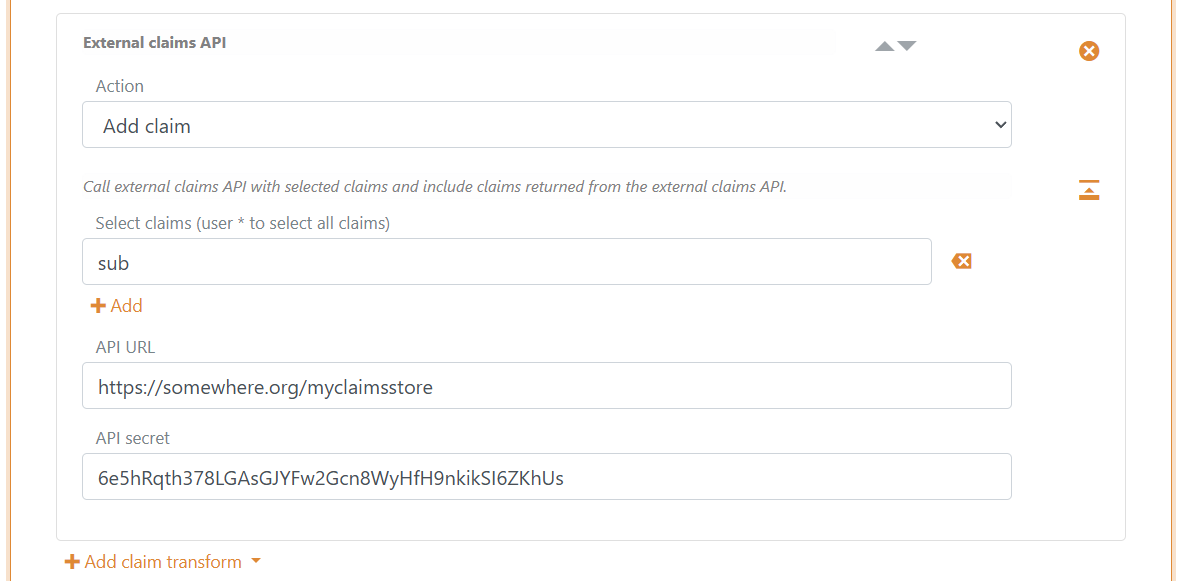
- Optionally set Target to load response claims into local claims
- Click Update
Claim transform examples
Split the name claim into the two claims given_name and family_name
The transformation will split the value in the name claim at the first occurring space and respectively add the given_name and family_name claims, if they do not already exist.
If there is more than one space in the name claim value, new given_name and family_name claims will not be added because they already exist.
Use two Regex map claim transformations.
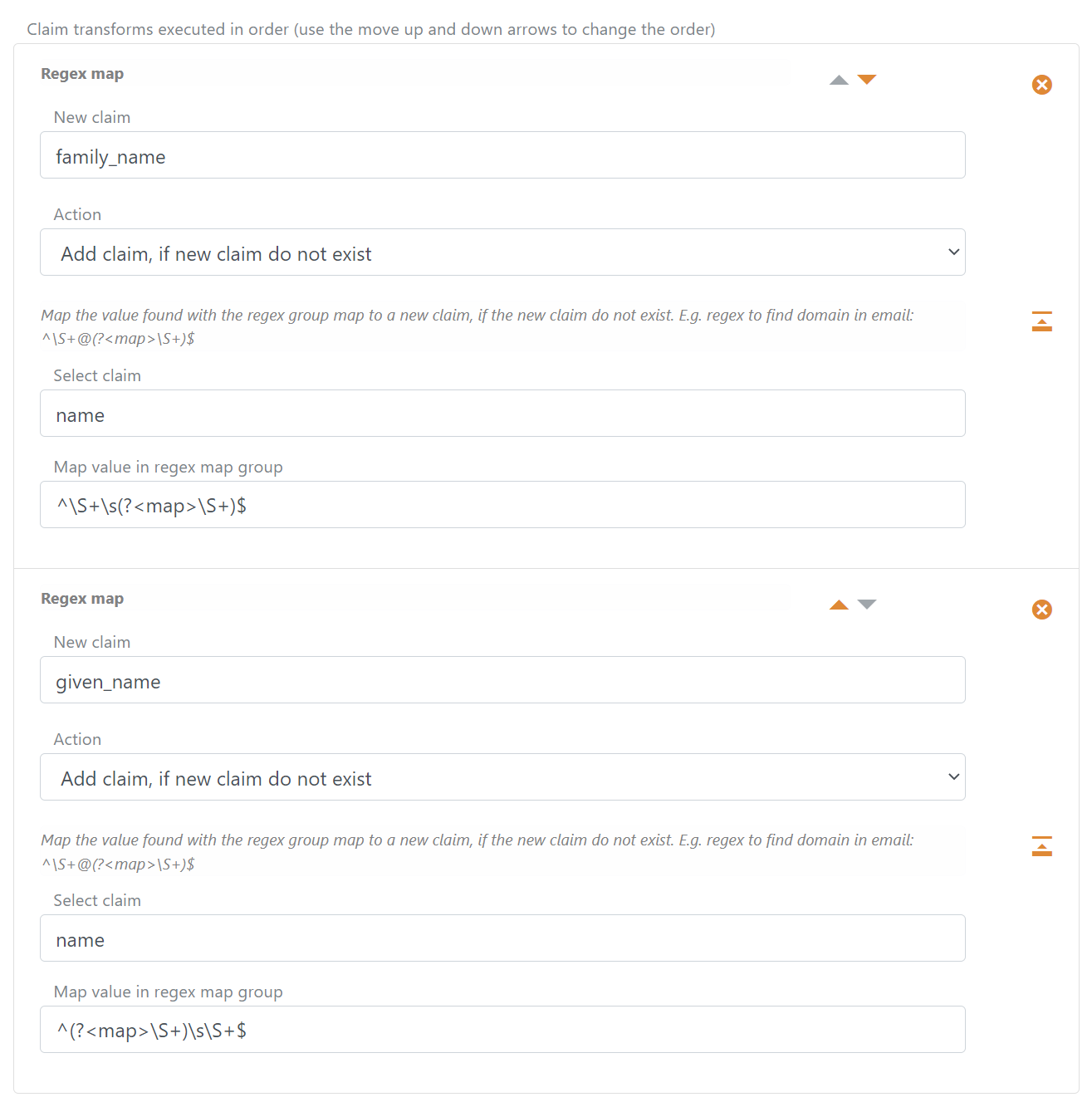
- Find the
family_nameclaim value with regex^\S+\s(?<map>\S+)$ - Find the
given_nameclaim value with regex^(?<map>\S+)\s\S+$
Remove the default added authentication method name from sub
The authentication method name is added by default to the sub claim value as a prefix divided by a pipe e.g., some-auth-method|my-external-user-id.
You can use a replace claim on the sub claim to remove the default-added prefix value.
The transformation will split the value in the sub claim and replace the claim with a new sub only containing the original ID.
Use a Regex map claim transformation and select the Replace claim action.
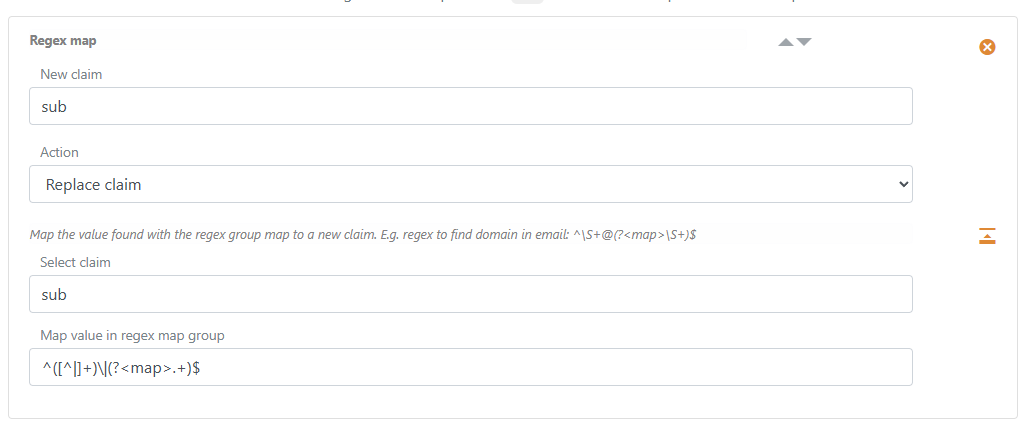
Find the ID without the default added post authentication method name with regex ^([^|]+)\|(?<map>.+)$
You can do the same in a SAML 2.0 authentication method using the
http://schemas.xmlsoap.org/ws/2005/05/identity/claims/nameidentifierclaim (which contains the SAML 2.0 Authn ResponseNameIDvalue) instead of thesubclaim.
Compare email with _local:mfa:email and add amr
The example runs in an authentication method used as an MFA item. It compares the authentication method's returned email claim with the Login user's _local:mfa:email.
If the two email values are equal and matched by a regular expression, the amr claim is added with the authentication method name as the value (the authentication method name is configured as the amr value).
The Login MFA flow uses the added amr claim to validate that the MFA item completed successfully. The returned email claim and other claims from the authentication method are not merged into the Login authentication method's claims.
Use a Concatenate claim transformation followed by a Regex match claim transformation.
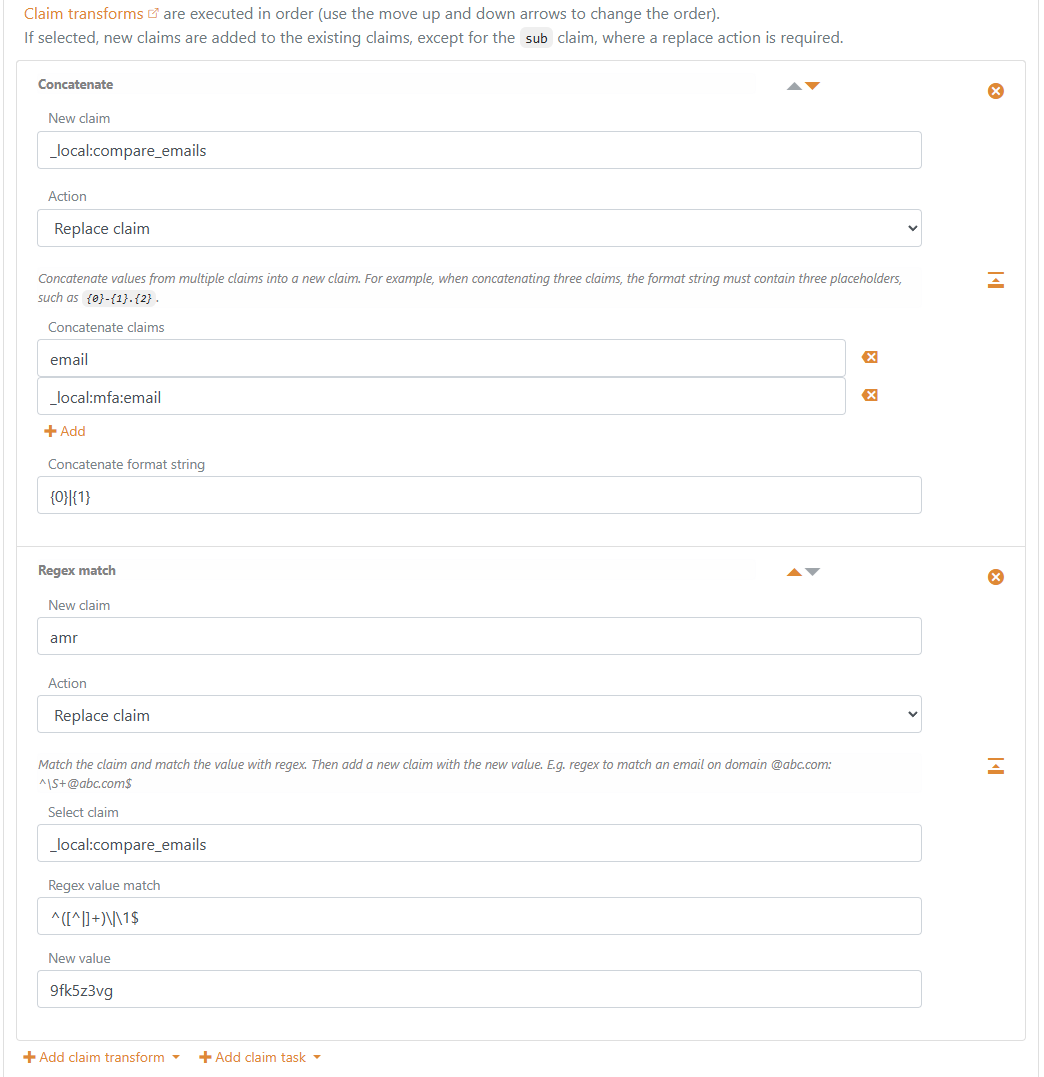
Concatenate: New claim_local:compare_emails, actionReplace claim, concatenate claimsemailand_local:mfa:email, concatenate format string{0}|{1}.Regex match: New claimamr, actionReplace claim, select claim_local:compare_emails, regex value match^([^|]+)\|\1$, new value set to the authentication method name (for example9fk5z3vg).
Impersonation
Use the Impersonation transform on an authentication method to issue claims for another user while retaining the original authenticated user as the actor. Sessions must be enabled on the authentication method; they are enabled by default.
Load the target using Query internal user, an external claims API, or both, with Target set to a name such as target. Check the authenticated user's permission and any required target claims before selecting that target with an Impersonation transform. The Target is required and defaults to target in the Control Client. An application request parameter selects a target; it does not grant permission to impersonate.
Retain a reference to the selected target in a session claim to repeat the lookup at subsequent application logins. The reference can be an internal user ID or an external profile ID and need not match the target's issued sub. The internal-user example below uses impersonation_target_id for both the request parameter and the session claim; these are example names that you configure to suit your flow.
The selected target must contain exactly one distinct, non-blank sub. Otherwise the transform continues without selecting that target. A disabled internal user query supplies no claims. Use a conditional error task if your policy requires rejecting the login when a target cannot be selected.
The transform prepares _impersonate: claims for completion after successful second-level transforms. For example, _local:target:sub becomes _impersonate:sub, and _local:target:_local:internal_user_id becomes _impersonate:_local:internal_user_id. You can also prepare these claims using ordinary transforms. They remain available between authentication-method transform sets and through Extended UI.
At completion, FoxIDs replaces the user's ordinary identity claims with the selected target's ordinary claims, retains the verified authentication context, and adds an act claim whose sub identifies the original authenticated user. This actor subject is the user's FoxIDs sub before impersonation replaces their claims. Application transforms receive this effective identity. Reserved helper claims are not issued to applications.
Internal target accounts
When _impersonate:_local:internal_user_id is present, FoxIDs checks that the internal user exists and is enabled, including applicable Access Structure policy, and associates the target account with the session and grants alongside the original account. If the internal target user is invalid, does not exist or is disabled, no impersonation is performed.
Disabling or deleting either associated account revokes the active session and refresh token grants. Access Structure access revocation and timed membership checks also apply to the associated target. For a target supplied solely by an API without an internal account association, the configured API and transforms determine whether the target is available at each login.
Example: impersonate an internal user
This example lets an employee with the role claim value allow_impersonation select an internal user and continue impersonating that user at later application logins. A login without a selected target proceeds as the original user.
The diagram follows the eight transforms configured below. The target reference is retained between logins; the target's claims and the employee's permission are checked again at each login.

Configure impersonation_target_id in Allowed request parameters on each application registration that sends it. The application supplies one internal user ID as the parameter value, which FoxIDs makes available as _local:params:impersonation_target_id. See Application request parameters. Ensure the employee's claims contain role=allow_impersonation.
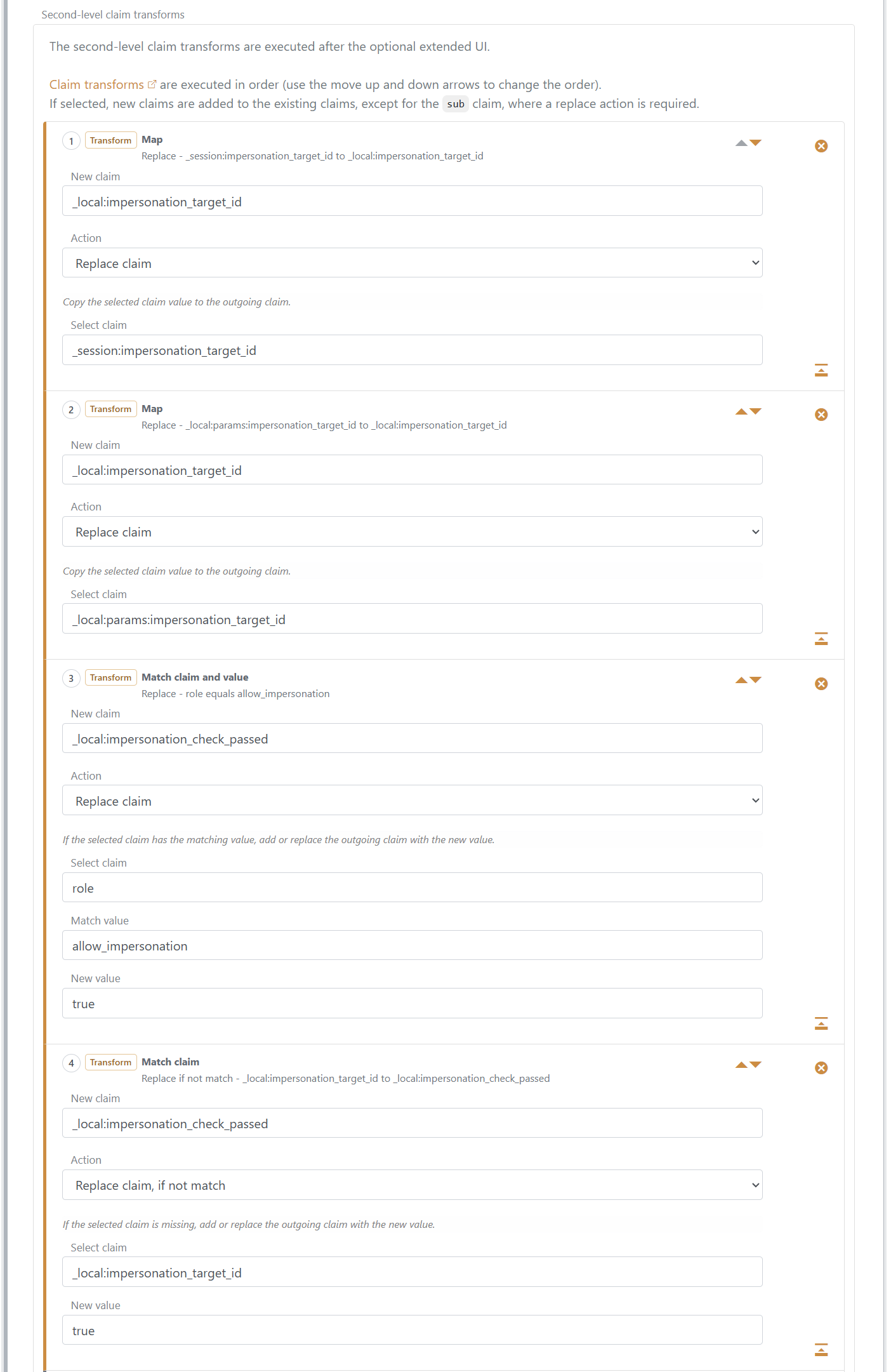
Add the following eight entries, in order, to the Login authentication method's Second-level claim transforms.
Map: restore the saved target reference. Use Replace claim, set Select claim to
_session:impersonation_target_idand New claim to_local:impersonation_target_id.Map: apply a target from the application. Use Replace claim, set Select claim to
_local:params:impersonation_target_idand New claim to_local:impersonation_target_id. A supplied parameter replaces the saved selection. When the parameter is absent, the value from step 1 remains.Match claim and value: check the employee's role. Use Replace claim, set Select claim to
role, Match value toallow_impersonation, New claim to_local:impersonation_check_passedand New value totrue.Match claim: allow login without a target. Use Replace claim, if not match, set Select claim to
_local:impersonation_target_id, New claim to_local:impersonation_check_passedand New value totrue.
The local check claim means that the login may continue: either the employee has the required role, or no target is selected. The role check runs before the target replaces the original user's claims.
Match claim and return error: reject an unauthorised selection. Use If not match and select
_local:impersonation_check_passed. Set Error toaccess_deniedand Error message toYou are not allowed to impersonate another user.Query internal user: load the target. Use Replace claim, set Lookup claim to
_local:impersonation_target_id, Lookup claim on internal user tosub, Claims from internal user to*and Target totarget. The lookup matches the internal user ID and loads the user's claims, including forwarded Access Structure claims and local helpers, under_local:target:. For example, it supplies_local:target:suband_local:target:_local:internal_user_id.Impersonation: select the loaded target. Use Replace claim and set Target to
target.Map: retain the target for subsequent logins. Use Replace claim, set Select claim to
_local:target:_local:internal_user_idand New claim to_session:impersonation_target_id. This saves the loaded user's stable ID as the reference for the next login.
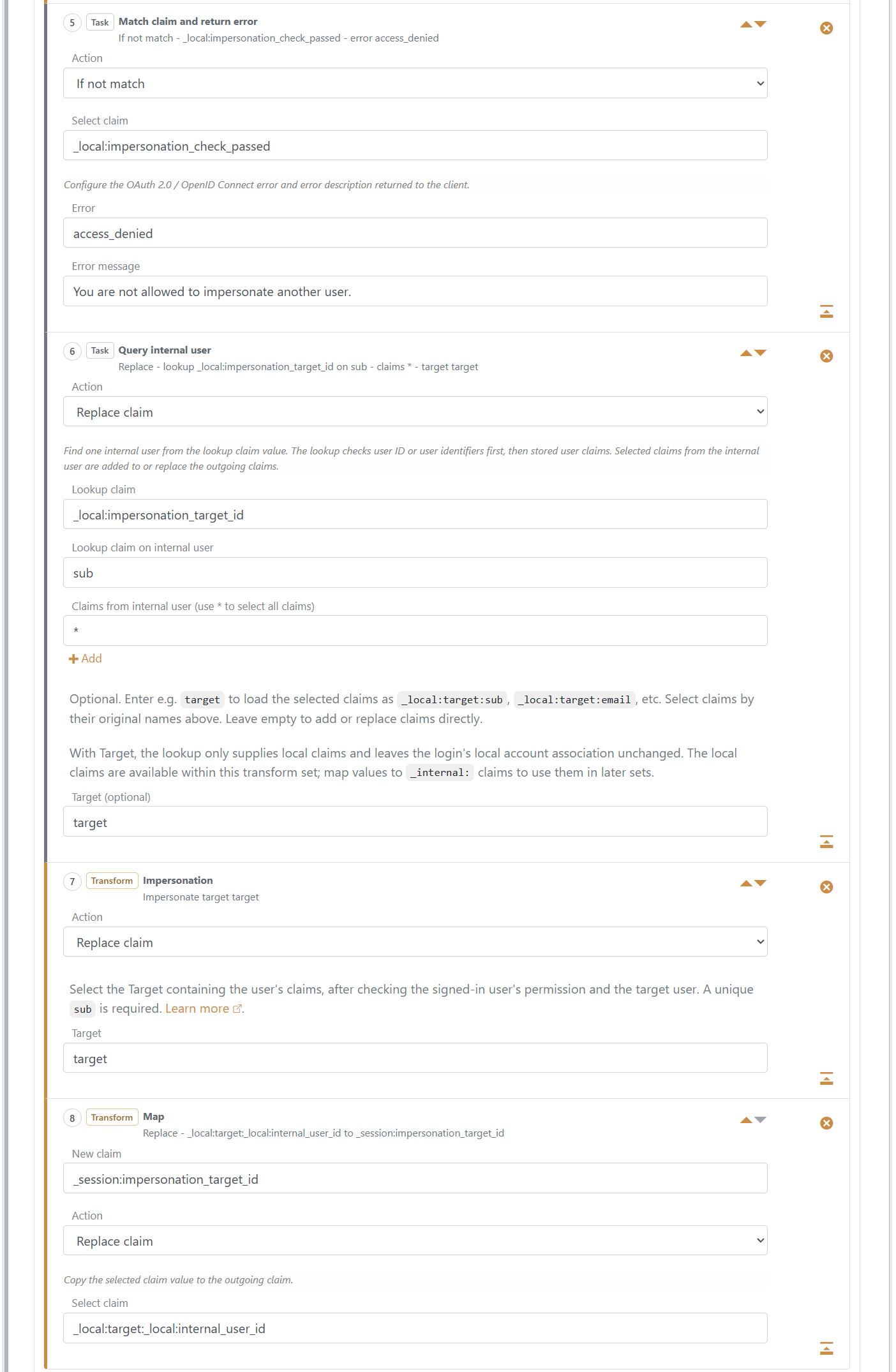
If your policy restricts which users may be impersonated, add the target checks between steps 6 and 7. For example, check _local:target:role or the Access Structure helper _local:target:_local:access_node.
If the lookup supplies no target, these eight steps complete without impersonation and retain any previously saved target reference. Add a conditional error task after the lookup if an unavailable target should reject the login, or explicitly remove the session claim if the saved selection should be cleared.
Continuing and changing impersonation
Every application login reruns the authentication-method transforms. In the example above, the transforms read the target reference from _session:impersonation_target_id when _local:params:impersonation_target_id is absent, then load the target's current claims and repeat the permission checks before selecting impersonation. The saved reference remains bound to the original authenticated user and the same authentication method.
To select another target, supply a new reference through the request parameter and replace the saved session claim after the new target passes your checks. To end impersonation, clear the saved reference and complete the transforms without a valid impersonation target.
A successful completion with the same target retains its sid. Selecting another target, starting impersonation or completing without a valid impersonation target starts a new sid and revokes the previous active session and refresh token grants.
UserInfo and grant redemption reject a revoked active session. Applications and APIs validating tokens locally must still apply their own session and token-lifetime rules. SAML single logout uses each application's recorded issuance values.
Active sessions and refresh token grants show the impersonated subject and original actor in the Control Client and Control API. Login audit events include the actor. Separate impersonation audit events record start, change and stop, including previous and current session IDs.