SMS provider
FoxIDs supports sending SMS messages with Access URL, Gateway API, Smstools and Telia SMS Gateway. The SMS provider can be configured as an SMS provider in each environment or generally in the FoxIDs site configuration.
FoxIDs sends SMS messages to users for verification codes, passwordless login and multi-factor authentication when SMS is enabled in the login flow.
FoxIDs includes standard SMS providers for supported provider APIs and a generic Access URL SMS provider for providers that are not built in. Use the standard providers when the provider API matches one of the supported integrations. Use Access URL when the provider can receive an HTTPS GET request with provider-specific query parameters.
Access URL
The Access URL provider is a generic provider for flexible SMS integrations. It calls a provider-specific HTTPS endpoint with the query parameters required by the concrete SMS provider. The API URL is an absolute HTTPS base URL without query parameters. Query parameters are configured separately and can use fixed values or placeholders.
Supported placeholders:
{phone}- the user's phone number.{message}- the SMS message text.{fromName}- the configured SMS sender name.
Example Access URL configuration:
- API URL:
https://some-provider.dk/sms/ username=xxxxxxpassword=yyyyyyrecipient={phone}from=zzzzzzor{fromName}message={message}
FoxIDs sends the request as HTTP GET and URL-encodes each query parameter value. The API URL is logged together with the phone number. Query parameters are not logged. If the provider returns an error, FoxIDs logs the phone number, SMS message, HTTP status code and the provider response.
Configure SMS provider in environment
The SMS provider can be configured in each environment, where the sender name is required. If an SMS provider is configured in the environment, it is used instead of any general configured SMS provider.
Access URL
Configure Access URL with an API URL and the query parameters required by the SMS provider. The API URL must be an absolute HTTPS base URL without query parameters. Add each query parameter separately and use placeholders where the value should be inserted at send time.
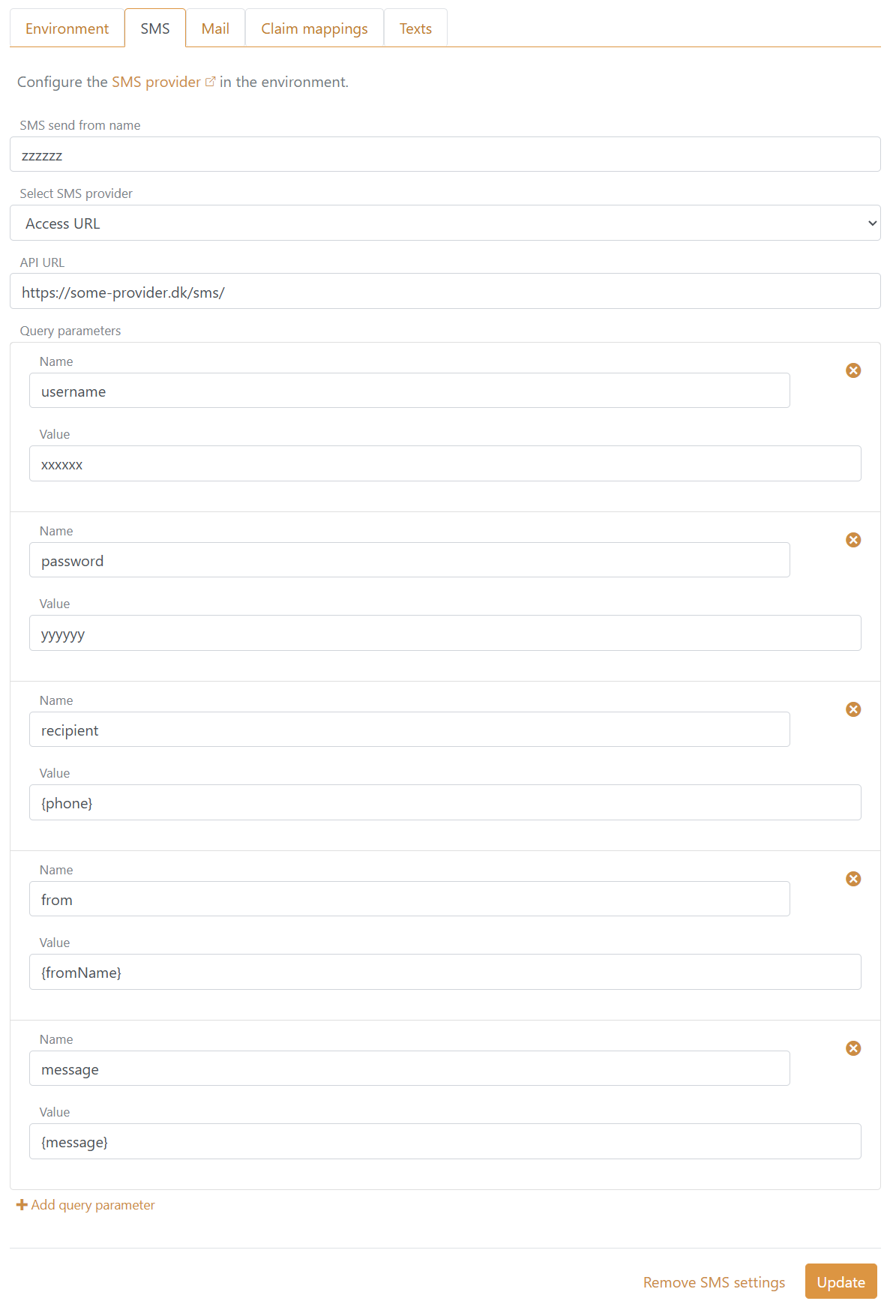
Required values:
- Type:
AccessUrl - Sender name
- API URL
- Query parameters with at least one
{phone}placeholder and one{message}placeholder
Gateway API
Configure Gateway API with the provider endpoint and token. The sender name is sent as the SMS sender, and the optional label is sent to Gateway API.
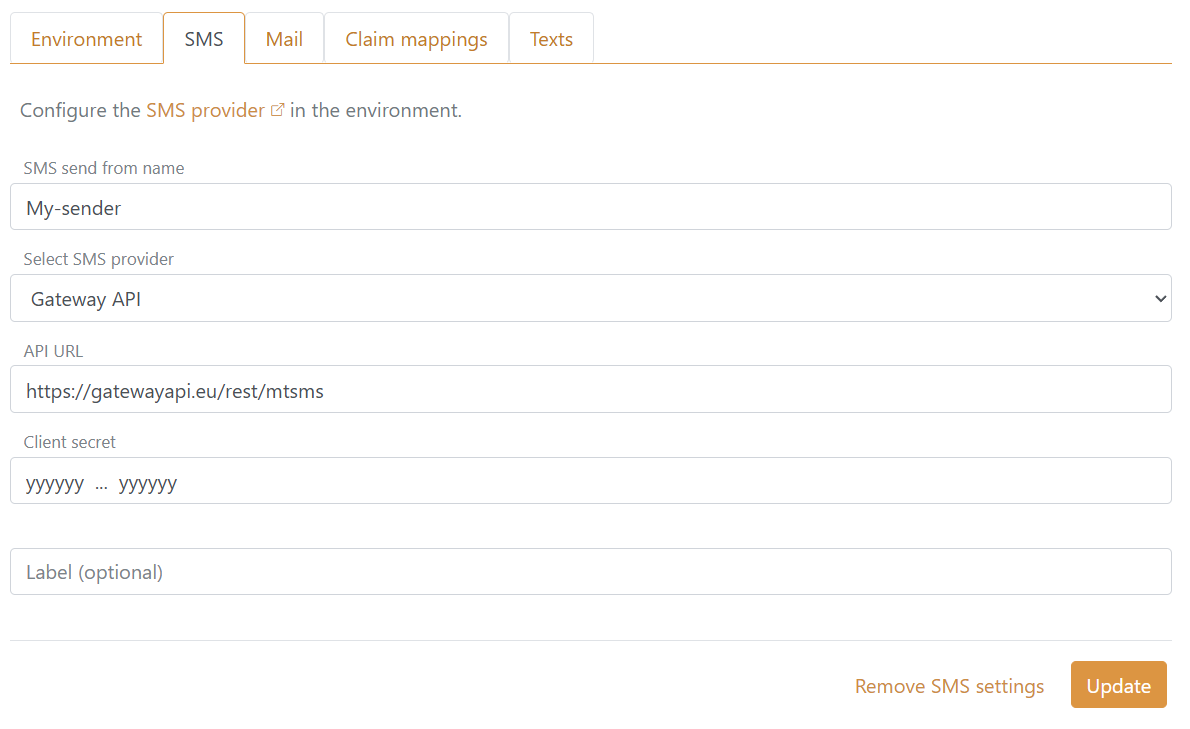
Required values:
- Type:
GatewayApi - Sender name
- API URL
- Client secret
Optional values:
- Label
Smstools
Configure Smstools with the provider endpoint, client ID and client secret. The sender name is sent as the SMS sender.
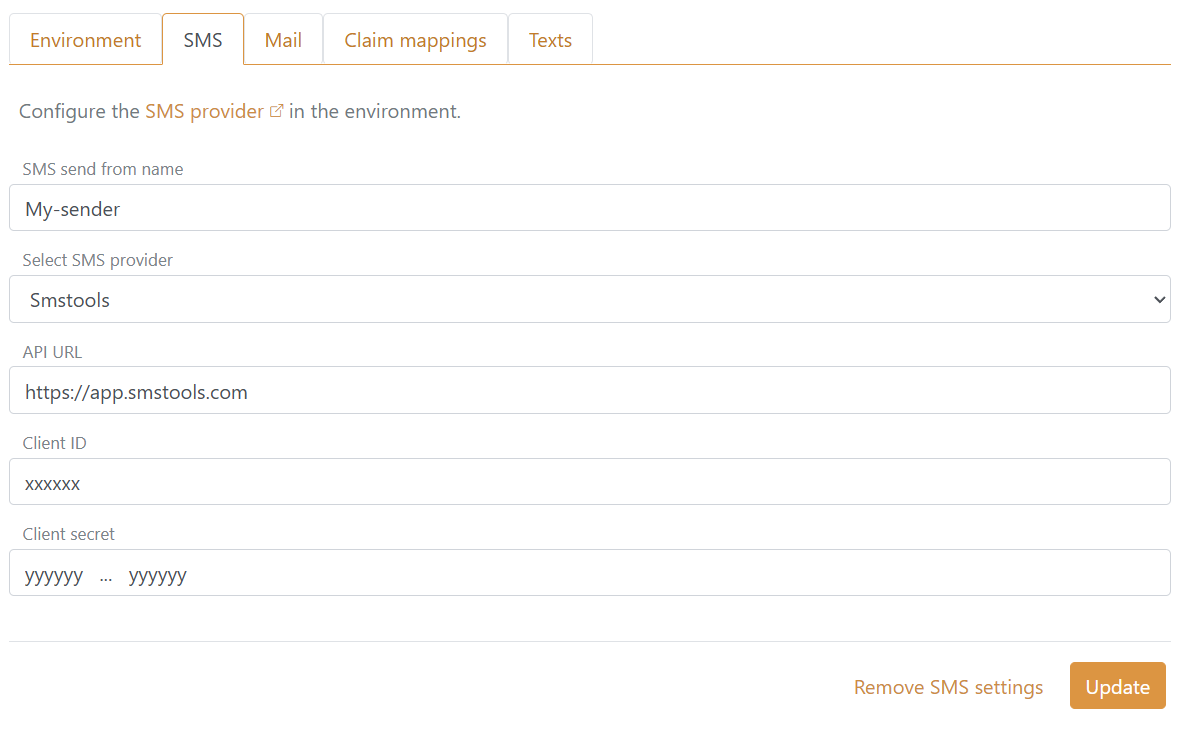
Required values:
- Type:
Smstools - Sender name
- API URL
- Client ID
- Client secret
Telia SMS Gateway
Configure Telia SMS Gateway with the provider endpoint, sender address, API key and mTLS certificate. The sender name is sent as the SMS sender name, and the client ID is sent as the sender address.
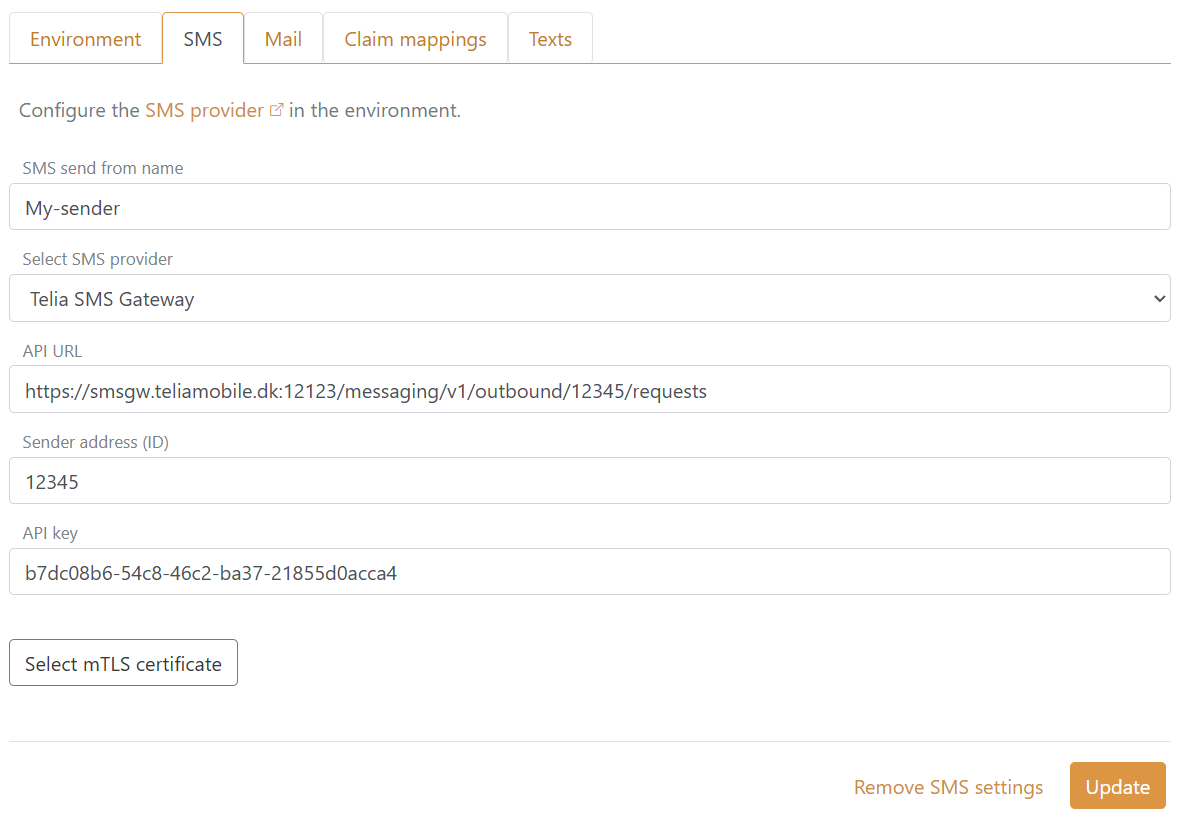
Required values:
- Type:
TeliaSmsGateway - Sender name
- API URL
- Client ID (sender address)
- Client secret (API key)
- mTLS certificate
Configure SMS provider generally
The SMS provider can optionally be configured generally in the FoxIDs site application settings. The sender name is required.
The API URL is required to be an absolute HTTPS URL for all SMS providers. For Access URL, the API URL must also be a base URL without query parameters and the query parameters must include at least one {phone} placeholder and one {message} placeholder.
Access URL
Configuring Access URL with application settings:
"Settings": {
  "Sms": {
    "Type": "AccessUrl",
    "FromName": "My-sender",
    "ApiUrl": "https://some-provider.dk/sms/",
    "Parameters": [
      {
        "Name": "username",
        "Value": "xxxxxx"
      },
      {
        "Name": "password",
        "Value": "yyyyyy"
      },
      {
        "Name": "recipient",
        "Value": "{phone}"
      },
      {
        "Name": "from",
        "Value": "{fromName}"
      },
      {
        "Name": "message",
        "Value": "{message}"
      }
    ]
  }
}
Configure Access URL query parameters in Parameters. Each parameter has a Name and a Value. The query parameters must include at least one {phone} placeholder and one {message} placeholder. The {phone}, {message} and {fromName} placeholders can be used in parameter values.
When FoxIDs is deployed to Kubernetes, configure the same application settings as environment variables on the foxids container. Use double underscores (__) to separate configuration levels. The Parameters setting is a list, so each query parameter uses a zero-based index in the variable name:
env:
  - name: "Settings__Sms__Type"
    value: "AccessUrl"
  - name: "Settings__Sms__FromName"
    value: "My-sender"
  - name: "Settings__Sms__ApiUrl"
    value: "https://some-provider.dk/sms/"
  - name: "Settings__Sms__Parameters__0__Name"
    value: "username"
  - name: "Settings__Sms__Parameters__0__Value"
    value: "xxxxxx"
  - name: "Settings__Sms__Parameters__1__Name"
    value: "password"
  - name: "Settings__Sms__Parameters__1__Value"
    valueFrom:
      secretKeyRef:
        name: sms-secret
        key: access-url-password
  - name: "Settings__Sms__Parameters__2__Name"
    value: "recipient"
  - name: "Settings__Sms__Parameters__2__Value"
    value: "{phone}"
  - name: "Settings__Sms__Parameters__3__Name"
    value: "from"
  - name: "Settings__Sms__Parameters__3__Value"
    value: "{fromName}"
  - name: "Settings__Sms__Parameters__4__Name"
    value: "message"
  - name: "Settings__Sms__Parameters__4__Value"
    value: "{message}"
Add another query parameter by using the next index, for example Settings__Sms__Parameters__5__Name and Settings__Sms__Parameters__5__Value. Sensitive fixed values such as passwords or API keys should be read from a Kubernetes Secret with valueFrom.secretKeyRef.
Gateway API
Configuring Gateway API with application settings:
"Settings": {
  "Sms": {
    "Type": "GatewayApi",
    "FromName": "My-sender",
    "ApiUrl": "https://gatewayapi.eu/rest/mtsms",
    "ClientSecret": "gateway-api-token",
    "Label": "FoxIDs"
  }
}
ClientSecret is sent as the Gateway API token. Label is optional.
Smstools
Configuring Smstools with application settings:
"Settings": {
  "Sms": {
    "Type": "Smstools",
    "FromName": "My-sender",
    "ApiUrl": "https://app.smstools.com",
    "ClientId": "client-id",
    "ClientSecret": "client-secret"
  }
}
Telia SMS Gateway
Configuring Telia SMS Gateway with application settings:
"Settings": {
  "Sms": {
    "Type": "TeliaSmsGateway",
    "FromName": "My-sender",
    "ApiUrl": "https://smsgw.teliamobile.dk:12123/messaging/v1/outbound/12345/requests",
    "ClientId": "12345",
    "ClientSecret": "b7dc08b6-54c8-46c2-ba37-21855d0acca4",
    "CertificatePemCrt": "-----BEGIN CERTIFICATE-----\n...\n-----END CERTIFICATE-----",
    "CertificatePemKey": "-----BEGIN PRIVATE KEY-----\n...\n-----END PRIVATE KEY-----"
  }
}
ClientId is sent as the sender address. ClientSecret is sent as the API key. The certificate and private key are used for mTLS.