Access structure
Access structure is used to model hierarchical access in an environment for both internal users and external users.
An access structure can represent customers, departments, responsibilities, roles, or similar business access groupings. Users are assigned through memberships to a node in the structure, and the effective access is resolved during login.
Access structure and nodes
Each access structure contains a single node hierarchy with exactly one root node.
A node contains:
- A name
- Optionally claims that describe the access represented by the node
- Optionally internal user access policy settings
- Optionally child nodes below it in the hierarchy
The hierarchy can be used to model access such as:
- Customer -> Department -> Role
- Organisation -> Team -> Responsibility
- Partner -> Region -> Function
Example: Acme Corp access structure
The following example models access for the Acme Corp customer with a finance department and an approver role:
Acme Corp (customer=acme)
  Finance (department=finance)
    Approver (role=approver)
In the access structure settings, the top node is Acme Corp with the customer=acme claim. The Finance child node adds the department=finance claim, and the Approver child node adds the role=approver claim and requires multi-factor authentication (MFA).
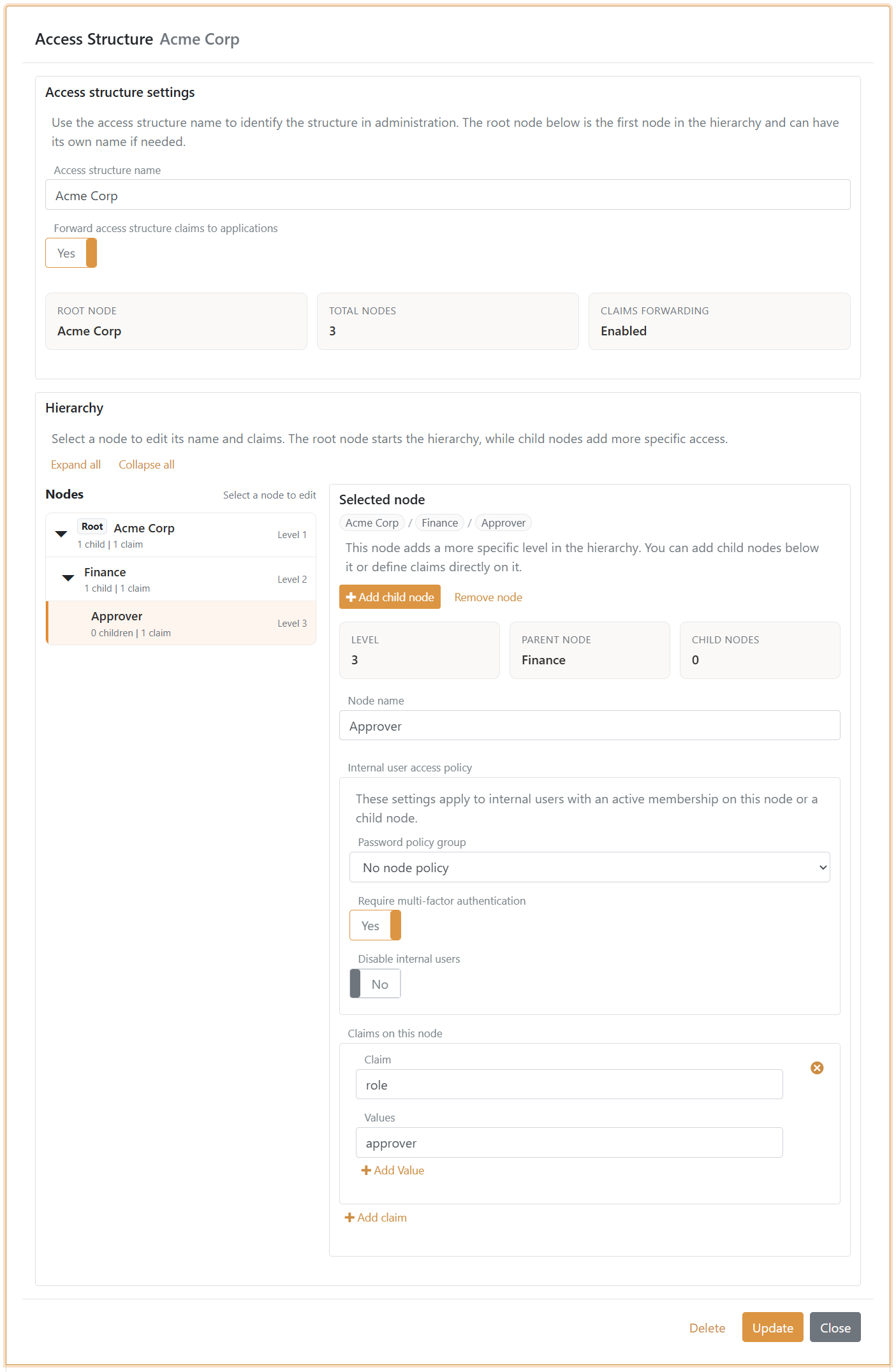
When a user is assigned through a membership to the Approver node, FoxIDs resolves the hierarchy from Approver to Acme Corp.
In claim transforms, the resolved values are available as _local: access claims.
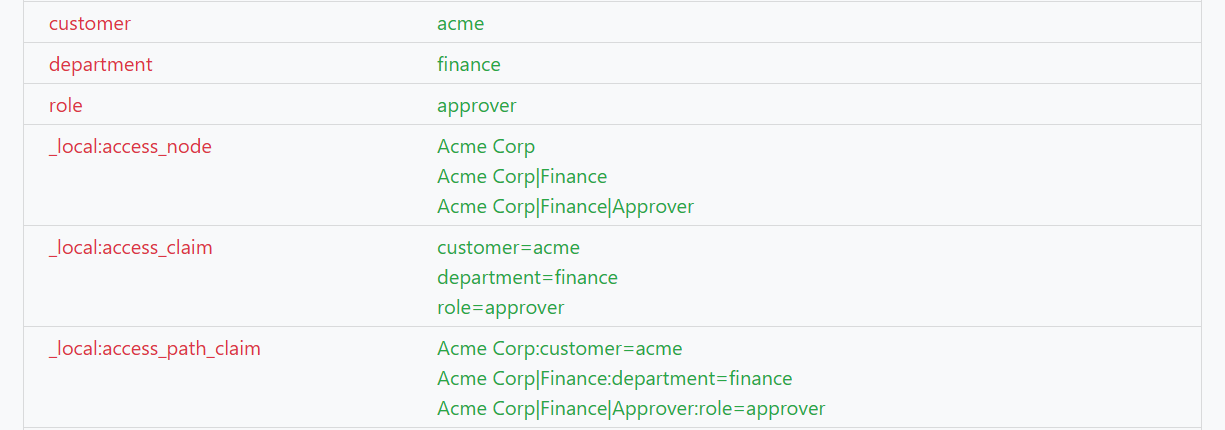
If Forward access structure claims to applications is enabled, the access claims are also forwarded to the claim transforms and applications. In this case the customer=acme, department=finance and role=approver claim.
User access policy
Access structure nodes can apply additional login policy to users. Password policy groups and multi-factor requirements apply to internal users, while disabling users applies to both internal and external users.
The following node settings are available:
- Password policy group
- Require multi-factor authentication
- Disable users
The settings apply to users with an active membership on the node and to users with active memberships on child nodes below it. For example, if MFA is required on Finance, it is also required for a user assigned to Approver below Finance.
If a user has multiple active memberships, FoxIDs combines all relevant node policies:
- A disable setting on any relevant node blocks login, the same as if the internal user itself is disabled.
- An MFA requirement on any relevant node requires MFA, even if the user does not require MFA directly.
- All relevant password policy groups are considered together with the password policy group configured directly on the user.
Password policy groups are prioritised in the environment settings. If multiple password policy groups apply to the user, FoxIDs uses the first matching group in the environment's password policy group list. The default environment password policy is used if no matching group applies.
Memberships
Users are connected to an access structure through memberships. A user can be connected to multiple access structures through multiple memberships and multiple nodes within each structure.
A membership:
- Applies to both internal users and external users
- References one node in an access structure
- Can optionally include a valid from and valid to time
Memberships are managed in the FoxIDs Control Client:
- On the Internal Users page for internal users
- On the External Users page for external users
- On the Access Structures page for user-centric membership management
Changing a user's memberships revokes the user's refresh token grants and active sessions. Disabling users through an access structure revokes grants and sessions linked to memberships on the affected nodes and their child nodes. FoxIDs combines rapid changes to the same access structure into one background revocation operation. Time-limited memberships are also evaluated when a refresh token grant or active session is used. See Grant and active session revocation.
Resolved access at login
At login, FoxIDs resolves the user's memberships and walks the node hierarchy from the assigned node to the root node.
The resolved result includes:
- Effective node paths
- Effective claims from the hierarchy
- Path-qualified claims
These values are made available before normal claim transforms execute, which means they can be used directly in existing claim transform and authorisation flows.
Local claims
Access structure resolution emits fixed local claim types.
The following local claims are available in claim transforms:
_local:access_node_local:access_claim_local:access_path_claim
This avoids dynamic claim types while still carrying hierarchy context in the claim values.
Forward claims to applications
Each access structure includes the Forward access structure claims to applications setting, defaulting to enabled.
If enabled, resolved access claims are forwarded to applications.
If disabled, the resolved access is still available locally inside claim transforms, but the resolved access claims are not forwarded to applications.
Typical use cases
- Model customer-specific access for internal and external users
- Assign users to departments and roles through memberships
- Resolve approver or reader responsibilities from a hierarchy
- Forward resolved access claims to applications when needed