FoxIDs Control API
Control API is a REST API with an online Swagger (OpenAPI) description and Swagger UI.
If you self-host FoxIDs, the Swagger (OpenAPI) document is exposed in FoxIDs Control on .../api/swagger/v2/swagger.json and the Swagger UI on .../api/swagger.
API reference
Swagger describes the exact routes, parameters, request and response schemas, and current status codes.
Error responses
Input validation errors identify the affected field when available, including the JSON path for conversion errors. Use the field name, error description and API reference to correct the request. When one field is identified, its name is also returned in the field response header. Multiple field errors are included in the message.
Exception responses include the exception message and messages from inner exceptions. Argument and validation exceptions return HTTP 400; unexpected failures return HTTP 500. Argument errors retain the parameter name. Stack traces are kept in the logs; use the request-id response header to find the corresponding diagnostic entry.
Resource guides
Resource guides explain how to combine related operations safely. They include workflows, examples, security considerations, and notable side effects without duplicating the complete OpenAPI contract.
Tenant structure
Configuration
Users and access
Operations
Terminology and endpoint structure
Control API naming:
- An environment is called a
track- An application registration is called
downparty- An authentication method is called
upparty
The Control API URL contains variables for the tenant name and track name (environment name) you want to operate on: .../{tenant_name}/{track_name}/....
Replace {tenant_name} with your tenant name and {track_name} with the environment's technical name. If you generate a proxy from the Swagger (OpenAPI) document, those variables are supplied as input parameters.
For example, to read an OpenID Connect application registration on FoxIDs Cloud with the technical name some_oidc_app, call (HTTP GET) https://control.foxids.com/api/{tenant_name}/{track_name}/!oidcdownparty?name=some_oidc_app (replace the variables with your tenant name and environment technical name).
Control Client settings
The Control Client loads its configuration in two steps. Before sign-in, GET .../api/@master/!clientsettings is public and returns only foxIDsEndpoint, the FoxIDs URL needed to start authentication.
After sign-in, GET .../api/{tenant_name}/!clientsettings returns version information and the payment, module and UI settings used by the Control Client. This request requires a bearer token for the tenant with basic or environment access rights. See the API reference for the exact response fields.
Authentication
You can call Control API either as a service/daemon using an OAuth 2.0 client (client credentials) or in the context of a user via an OpenID Connect client.
The steps below create an OAuth 2.0 client and grant it admin-level access rights via scopes and roles.
Create an OAuth 2.0 client in the FoxIDs Control Client:
- Select the master environment (in the header).
- Select the Applications tab.
- Click New Application.
- Click Backend Application.
- Add a Name e.g.,
My API Client. - Click Register.
- Copy the Client ID and Client secret.
- Click Close.
- Add a Name e.g.,
- Click your client registration in the list to open it.
- In the Resource and scopes section - grants the client access to your tenant:
- Click Add Resource and scope and add the resource
foxids_control_api. - Click Add Scope and add the scope
foxids:tenant.
- Click Add Resource and scope and add the resource
- Select Show advanced.
- In the Issue claims section - grants the client the tenant administrator role:
- Click Add Claim and add the claim
role. - Click Add Value and add the claim value
foxids:tenant.admin.
- Click Add Claim and add the claim
- Click Update.
Then perform an OAuth 2.0 Client Credentials Grant request to obtain an access token for Control API.
Replace {tenant_name}, {track_name}, {client_id} and {client_secret}. Change the domain if you are self-hosting.
Postman sample
This Postman collection authenticates with the OAuth 2.0 client My API Client and returns the users for the configured environment (track).
Create a Postman collection JSON file, e.g., foxids_control_api.postman_collection.json, with the content below. Replace {tenant_name}, {track_name}, {client_id} and {client_secret}. Change the domains (foxids.com and control.foxids.com) if you are self-hosting.
{
  "info": {
    "name": "FoxIDs API",
    "schema": "https://schema.getpostman.com/json/collection/v2.1.0/collection.json"
  },
  "item": [
    {
      "name": "GET users",
      "request": {
        "auth": {
          "type": "oauth2",
          "oauth2": [
            {
              "key": "accessTokenUrl",
              "value": "https://foxids.com/{tenant_name}/master/{client_id}/(*)/oauth/token",
              "type": "string"
            },
            {
              "key": "clientSecret",
              "value": "{client_secret}",
              "type": "string"
            },
            {
              "key": "clientId",
              "value": "{client_id}",
              "type": "string"
            },
            {
              "key": "tokenName",
              "value": "api_access_token",
              "type": "string"
            },
            {
              "key": "client_authentication",
              "value": "body",
              "type": "string"
            },
            {
              "key": "scope",
              "value": "foxids_control_api:foxids:tenant",
              "type": "string"
            },
            {
              "key": "grant_type",
              "value": "client_credentials",
              "type": "string"
            },
            {
              "key": "addTokenTo",
              "value": "header",
              "type": "string"
            }
          ]
        },
        "method": "GET",
        "header": [],
        "url": {
          "protocol": "https",
          "host": [
            "control.foxids.com"
          ],
          "port": "443",
          "path": [
            "api",
            "{tenant_name}",
            "{track_name}",
            "!users"
          ]
        }
      }
    }
  ]
}
HTTP request sample
This HTTP sample authenticates as the OAuth 2.0 client My API Client with the client credentials grant.
POST https://foxids.com/{tenant_name}/master/{client_id}(*)/oauth/token HTTP/1.1
Host: foxids.com
Content-Type: application/x-www-form-urlencoded

client_id={client_id}
&client_secret={client_secret}
&grant_type=client_credentials
&scope=foxids_control_api%3Afoxids%3Atenant
Token JSON response:
HTTP/1.1 200 OK
Content-Type: application/json
Cache-Control: no-cache, no-store

{
    "access_token":"eyJhGfjlc...nNjH3iIWvMdCM",
    "token_type":"Bearer",
    "expires_in":3600
}
The access_token is used to call the Control API.
C# code sample
This C# sample authenticates as the OAuth 2.0 client My API Client with the client credentials grant.
// NuGet package: ITfoxtec.Identity
using ITfoxtec.Identity.Helpers;

var oidcDiscoveryUrl = "https://foxids.com/{tenant_name}/master/{client_id}(*)/.well-known/openid-configuration";
// Inject IHttpClientFactory httpClientFactory
var oidcDiscovery = new OidcDiscoveryHandler(httpClientFactory, oidcDiscoveryUrl);

// Inject IHttpClientFactory httpClientFactory
var tokenHelper = new TokenHelper(httpClientFactory, oidcDiscovery);

var clientId = "{client_id}";
var clientSecret = "{client_secret}";
var scope = "foxids_control_api:foxids:tenant";
(var accessToken, var expiresIn) = await tokenHelper.GetAccessTokenWithClientCredentialGrantAsync(clientId, clientSecret, scope);
Then call the Control API with the access token as an Authorization Bearer header, as defined in the OAuth 2.0 Bearer Token (RFC 6750) standard.
C# code sample
This C# sample shows how to add the access token to the HttpClient and read the OpenID Connect application registration some_oidc_app (technical name).
// NuGet package: ITfoxtec.Identity
using ITfoxtec.Identity;

// Inject IHttpClientFactory httpClientFactory
var httpClient = httpClientFactory.CreateClient();
// Add the access token
httpClient.SetAuthorizationHeaderBearer(accessToken);

// Call Control API using the httpClient
// E.g. read an OpenID Connect application registration
using var response = await httpClient.GetAsync("https://control.foxids.com/api/{tenant_name}/{track_name}/!oidcdownparty?name=some_oidc_app");
API access rights
This shows the Control API configuration in a tenant's master environment with the default set of scopes that grant access to tenant data.
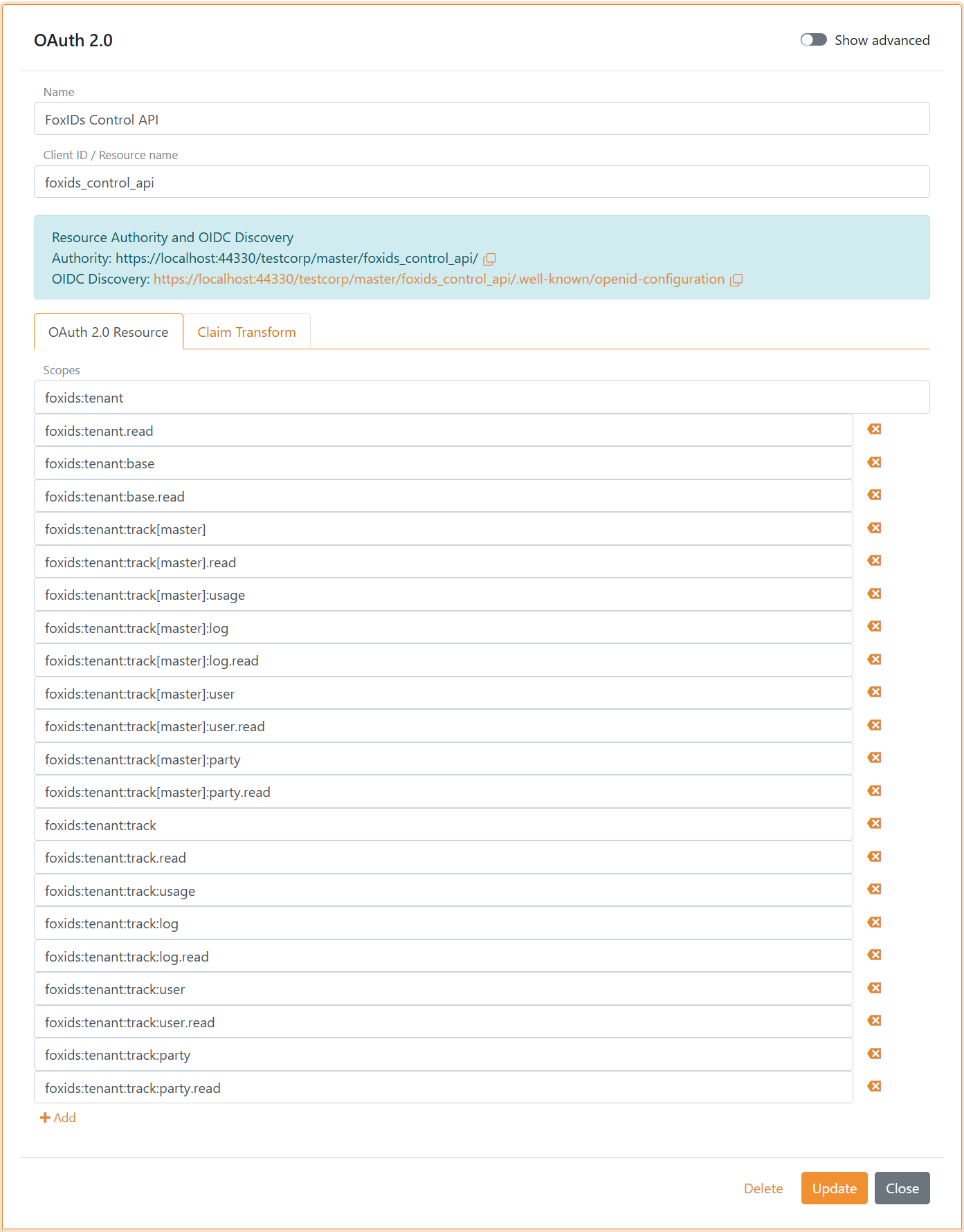
You can add more scopes to extend Control API access rights per environment to achieve least-privilege configurations.
Access to Control API is limited by scopes and roles. There are two scope families: foxids:master grants access to master-tenant data and foxids:tenant grants access to tenant data.
The Control API resource foxids_control_api is defined in each tenant's master environment, and the configured scopes grant access to that tenant's data through Control API.
A scope's access can be narrowed by adding more elements separated with semicolons and dots. Dot notation limits to a specific sub-role and is used in both scopes and roles. Callers must present one or more matching scope(s) and role(s).
Each access right is defined as both a scope and a role. This lets you grant or limit access at both client and user level. Access rights are hierarchical, and the client and user do not need matching scopes and roles.
The administrator role foxids:tenant.admin grants access to all data in a tenant and the master tenant data; it is equivalent to having the roles foxids:tenant and foxids:master.
A client requests a scope by specifying the resource and scope separated by a semicolon. For example, to request the foxids:tenant:track:party.create scope the client requests foxids_control_api:foxids:tenant:track:party.create.
If a request is denied due to insufficient access rights, a trace item is logged with the possible authorising scopes and roles along with the user's actual scopes and roles.
Tenant access rights
The tenant access rights are both scopes and roles.
If the scope you need is not defined on the Control API
foxids_control_apiyou can add the scope.
The :track[xxxx] specifies an environment by the technical name. e.g., a Test environment with the technical name hsgm7je5 is :track[hsgm7je5]
and a Production environment with the technical name - is :track[-].
| Scope / role | Access |
|---|---|
| Access to everything in the tenant, not master tenant data. | |
foxids:tenant |
read, create, update, delete |
foxids:tenant.read |
read |
foxids:tenant.create |
create |
foxids:tenant.update |
update |
foxids:tenant.delete |
delete |
| Access to basic tenant elements:
|
|
foxids:tenant:basic |
read, create, update, delete |
foxids:tenant:basic.read |
read |
foxids:tenant:basic.create |
create |
foxids:tenant:basic.update |
update |
foxids:tenant:basic.delete |
delete |
| Access to everything in all environments in a tenant, not including the master environment. | |
foxids:tenant:track |
read, create, update, delete |
foxids:tenant:track.read |
read |
foxids:tenant:track.create |
create |
foxids:tenant:track.update |
update |
foxids:tenant:track.delete |
delete |
| Access to everything in a specific environment in a tenant. `xxxx` is the environment's technical name. | |
foxids:tenant:track[xxxx] |
read, create, update, delete |
foxids:tenant:track[xxxx].read |
read |
foxids:tenant:track[xxxx].create |
create |
foxids:tenant:track[xxxx].update |
update |
foxids:tenant:track[xxxx].delete |
delete |
| All usage logs in all environments in a tenant, not including the master environment. Not applicable in the master tenant. | |
foxids:tenant:track:usage |
read |
| Usage logs in a specific environment in a tenant. Not applicable in the master tenant. | |
foxids:tenant:track[xxxx]:usage |
read |
| All audit logs in all environments in a tenant, not including the master environment. | |
foxids:tenant:track:audit |
read |
| Audit logs in a specific environment in a tenant. | |
foxids:tenant:track[xxxx]:audit |
read |
| All logs in all environments in a tenant, not including the master environment. | |
foxids:tenant:track:log |
read, create, update, delete |
foxids:tenant:track:log.read |
read |
foxids:tenant:track:log.create |
create |
foxids:tenant:track:log.update |
update |
foxids:tenant:track:log.delete |
delete |
| Logs in a specific tenant. | |
foxids:tenant:track[xxxx]:log |
read, create, update, delete |
foxids:tenant:track[xxxx]:log.read |
read |
foxids:tenant:track[xxxx]:log.create |
create |
foxids:tenant:track[xxxx]:log.update |
update |
foxids:tenant:track[xxxx]:log.delete |
delete |
| All users and access structure memberships in all environments in a tenant, not including the master environment. | |
foxids:tenant:track:user |
read, create, update, delete |
foxids:tenant:track:user.read |
read |
foxids:tenant:track:user.create |
create |
foxids:tenant:track:user.update |
update |
foxids:tenant:track:user.delete |
delete |
| All users and access structure memberships in a specific environment in a tenant. | |
foxids:tenant:track[xxxx]:user |
read, create, update, delete |
foxids:tenant:track[xxxx]:user.read |
read |
foxids:tenant:track[xxxx]:user.create |
create |
foxids:tenant:track[xxxx]:user.update |
update |
foxids:tenant:track[xxxx]:user.delete |
delete |
| All access structures and access structure memberships in all environments in a tenant, not including the master environment. | |
foxids:tenant:track:accessstructure |
read, create, update, delete |
foxids:tenant:track:accessstructure.read |
read |
foxids:tenant:track:accessstructure.create |
create |
foxids:tenant:track:accessstructure.update |
update |
foxids:tenant:track:accessstructure.delete |
delete |
| All access structures and access structure memberships in a specific environment in a tenant. | |
foxids:tenant:track[xxxx]:accessstructure |
read, create, update, delete |
foxids:tenant:track[xxxx]:accessstructure.read |
read |
foxids:tenant:track[xxxx]:accessstructure.create |
create |
foxids:tenant:track[xxxx]:accessstructure.update |
update |
foxids:tenant:track[xxxx]:accessstructure.delete |
delete |
| All application registrations and authentication methods in all environments in a tenant, not including the master environment. | |
foxids:tenant:track:party |
read, create, update, delete |
foxids:tenant:track:party.read |
read |
foxids:tenant:track:party.create |
create |
foxids:tenant:track:party.update |
update |
foxids:tenant:track:party.delete |
delete |
| All application registrations and authentication methods in a specific environment in a tenant. | |
foxids:tenant:track[xxxx]:party |
read, create, update, delete |
foxids:tenant:track[xxxx]:party.read |
read |
foxids:tenant:track[xxxx]:party.create |
create |
foxids:tenant:track[xxxx]:party.update |
update |
foxids:tenant:track[xxxx]:party.delete |
delete |
Master tenant access rights
The master tenant access rights are both scopes and roles.
| Scope / role | Access |
|---|---|
| Access to the master tenant data Can list, create and delete tenants but not look into other tenants. |
|
foxids:master |
read, create, update, delete |
foxids:master.read |
read |
foxids:master.create |
create |
foxids:master.update |
update |
foxids:master.delete |
delete |
| Audit log in the master tenant. | |
foxids:master:audit |
read |
| Usage log in the master tenant. | |
foxids:master:usage |
read |