If your application serves Swedish municipalities, municipal staff should be able to sign in using their existing work identities. As you add municipalities, you need to connect to different identity providers without building a new login integration in your application for each one.
We already have customers using FoxIDs to connect their applications to multiple Swedish municipalities’ identity providers.
One application integration, several municipal connections
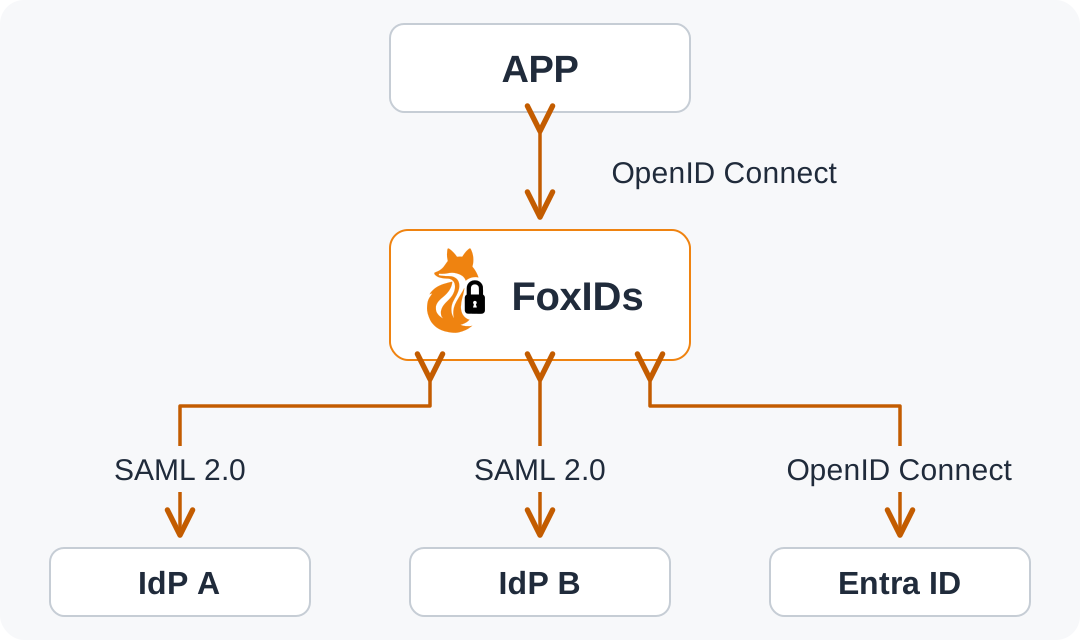
Your application can integrate with FoxIDs through OpenID Connect. You configure connections to municipal identity providers as authentication methods in FoxIDs and allow your application to use them. These connections can use SAML 2.0 or OpenID Connect, independently of the protocol your application uses. A municipality can have a dedicated connection, while several municipalities using Microsoft Entra ID can share a multitenant connection.
This means you can keep the same OpenID Connect integration in your application as you add municipalities. Each FoxIDs customer configures their own municipal connections in their own FoxIDs environment, in agreement with each municipality's IT team.
Identity platforms used by Swedish municipalities
The following identity platforms cover most Swedish municipalities and have been verified with FoxIDs by customers:
Most Swedish municipalities prefer SAML 2.0 for these connections. OpenID Connect is also an option when supported and offered by the municipality. Start by asking its IT team which protocol and configuration they use for external applications.
Let the municipality handle MFA and Swedish eIDs
The municipality's identity provider handles multi-factor authentication (MFA) and the integration with the electronic identification methods it offers its employees. It maps the verified person to the employee's identity. FoxIDs receives that identity and the agreed claims through the SAML 2.0 or OpenID Connect connection.
Swedish electronic identification (e-legitimation) includes both personal identities and identities issued for use at work. Relevant examples are:
- BankID and Freja+ (Freja eID+): personal electronic identities that a municipality may offer for employee sign-in.
- Freja OrganisationsID: an employee identity issued via the employer.
- SITHS: an employee identity used in municipalities, regions and healthcare, available on a card or a mobile device.
The municipality decides which methods it offers. Digg's overview of approved electronic identities includes further options.
For this setup, neither FoxIDs nor your application needs a direct integration with BankID, Freja or SITHS.
Examples of municipal login pages. Municipality names, logos and local contact details have been removed; the screenshots illustrate login options and do not imply a customer relationship with FoxIDs. Open an image to view it at a larger size.


Route users by their email domain
A useful setup is to connect your own Microsoft Entra ID multitenant application through OpenID Connect and use it as the shared default alongside dedicated municipal connections.
Use Home Realm Discovery (HRD) to select an authentication method based on the user's email domain. Allow the relevant authentication methods for your application and configure their HRD domains as follows:
- On each dedicated municipal authentication method, enter the municipality's email domain or domains. A matching domain selects that municipality's identity provider.
- On the shared Microsoft Entra ID authentication method, enter
*as the HRD domain. This provides the fallback for email domains not configured on another authentication method.
This lets you keep specific municipal connections where needed and use one Entra ID connection for the remaining domains. Configure the Entra ID tenants you trust as part of the multitenant setup.
Control access with external users in FoxIDs
If you want to manage who can sign in through FoxIDs, you can pre-create external users for the relevant authentication method using their known email addresses. Create them in the FoxIDs Control Client or through the Control API. Configure the authentication method to require an existing external user and leave automatic user creation disabled.
Configure email as the redemption claim and a stable user identifier as the link claim, and agree with municipal IT that the identity provider supplies both. At the first login, FoxIDs matches the email claim received from the municipality's identity provider to the pre-created user. This is redemption via email: FoxIDs links the user to the stable external user ID and uses that ID for subsequent logins.
You can store claims on each external user or manage their permissions through access structures in FoxIDs. Configure the relevant claims to be forwarded to your application, which uses them to associate the user with the correct municipality and enforce access to its data.
Set up the first municipality connection
In our experience, establishing the connection with the municipality's IT team usually goes smoothly. A useful starting point is to agree who configures each side and who can provide a test account.
Agree the information your application needs
Explain which users need access and what information your application expects after sign-in. Agree a stable user identifier and the necessary attributes, such as name, email address or organisational information. Confirm which attributes the municipality can supply instead of assuming that every municipality uses the same names and values.
Exchange configuration with municipal IT
For SAML 2.0, create an authentication method in FoxIDs and configure it with the municipality's identity provider metadata. Prefer the municipality's metadata URL when one is available, and ask its IT team to use the metadata URL of your FoxIDs SAML 2.0 authentication method when configuring the municipality's identity provider.
With metadata URLs in both directions and automatic metadata updates enabled on both sides, public certificates can be exchanged and updated automatically when they are renewed or replaced. Follow the SAML 2.0 authentication method guide for the configuration.
For OpenID Connect, coordinate the client registration with municipal IT. Configure the authority and client details in FoxIDs, and give the IT team the redirect URI shown for the authentication method. The OpenID Connect authentication method guide describes the configuration.
Test the complete application login
Start with a test application in FoxIDs. Select Test authentication on the relevant authentication method and open the test application to see the returned claims directly on the page. Share the test application's URL with municipal IT and selected users. A test account can be used to check that the expected claims are returned, while individual users can confirm that they can sign in.
Then test the complete login in your own application. Check that users are associated with the correct municipality and receive the intended access. Include both a user who should have access and one who should not. If you use external users, also test first-login redemption and a subsequent login using the linked identity.
Your application's integration with FoxIDs remains the same for all municipalities.
Assistance when you need it
Customers normally communicate directly with municipal IT and configure the connections themselves. We have helped several customers connect to different municipalities, but our assistance has rarely been needed. When customers have needed help, it has usually been at the beginning.
If you need help, the FoxIDs team can assist with integrating your application with FoxIDs or configuring and testing a municipal connection. We can also help with the security architecture of your overall solution and address specific security questions. You can arrange an online meeting to discuss your first connection or a particular requirement.
FoxIDs is Danish and EU owned and developed in Denmark. FoxIDs Cloud is hosted in France with EU-owned hosting providers. See our deployment options if ownership, hosting or operating the platform yourself is part of your evaluation.