Anslut IdentityServer med OpenID Connect
FoxIDs kan anslutas till en IdentityServer med OpenID Connect och därmed autentisera slutanvändare i en IdentityServer.
Det är möjligt att ansluta en IdentityServer klient och läsa claims från ID token eller välja ett mer komplext fall där claims läses från access token.
Sample
IdentityServerOidcOpSampleär konfigurerad i FoxIDstest-corpmed autentiseringsmetod namnetidentityserver_oidc_op_sample. Du kan testa login (användarnamnaliceoch lösenordalice) medIdentityServerOidcOpSampleochAspNetCoreOidcAuthorizationCodeSamplesamples genom att klickaOIDC IdentityServer Log iniAspNetCoreOidcAuthorizationCodeSampleapplikationen.IdentityServerOidcOpSamplesample är konfigurerad med Implicit Flow för att möjliggöra lokal testning, använd Authorization Code Flow i produktion.
Se IdentityServer sample konfigurationen i FoxIDs Control: https://control.foxids.com/test-corp Logga in med e-postadressen och lösenordet för läsaren som visas på inloggningssidan och välj sedan miljön
Productionoch flikenAuthentication.
Konfigurera IdentityServer
Det här avsnittet beskriver hur du konfigurerar en anslutning med OpenID Connect Authorization Code flow och PKCE, vilket är det rekommenderade OpenID Connect flowet.
1 - Börja med att skapa en OpenID Connect autentiseringsmetod i FoxIDs Control Client
- Lägg till namnet
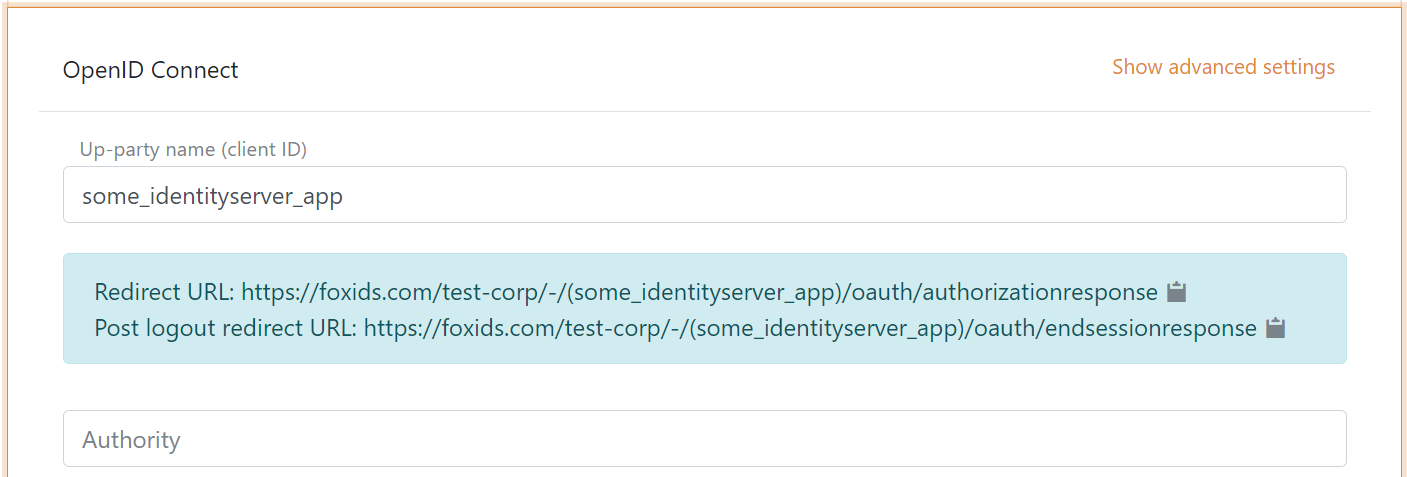
Det är nu möjligt att läsa Redirect URL och Post logout redirect URL.
2 - Gå sedan till IdentityServer konfigurationen och skapa klienten
yield return new Client
{
    ClientId = "some_identityserver_app",

    AllowedGrantTypes = GrantTypes.Code,
    RequirePkce = true,
    ClientSecrets =
    {
        new Secret("BpCbINKwxELM ... eVpMClM84Rr0".Sha256())
    },

    AlwaysIncludeUserClaimsInIdToken = true,

    RedirectUris = { "https://foxids.com/test-corp/-/(some_identityserver_app)/oauth/authorizationresponse" },
    PostLogoutRedirectUris = { "https://foxids.com/test-corp/-/(some_identityserver_app)/oauth/endsessionresponse" },

    AllowedScopes = new List<string>
    {
        IdentityServerConstants.StandardScopes.OpenId,
        IdentityServerConstants.StandardScopes.Profile,
        IdentityServerConstants.StandardScopes.Email,
    }
};
Kod från IdentityServerOidcOpSample sample konfiguration.
3 - Gå tillbaka till FoxIDs autentiseringsmetoden i FoxIDs Control Client
- Lägg till IdentityServer authority
- Lägg till profile och email scopes (möjliga andra eller fler scopes)
- Lägg till IdentityServer klientens client secret värde som client secret
- Välj show advanced
- Välj use claims from ID token
- Lägg till de claims som överförs från autentiseringsmetoden till applikationsregistreringarna. T.ex. email, email_verified, name, given_name, family_name, role och eventuellt access_token claim för att överföra IdentityServer access token
- Klicka create
Det var allt.
Den nya autentiseringsmetoden kan nu väljas som en tillåten autentiseringsmetod i en applikationsregistrering. Applikationsregistreringen kan läsa claims från autentiseringsmetoden. Det är möjligt att lägga till access_token claim för att inkludera IdentityServer access token som en claim i det utfärdade access token.
Läs claims från access token
Om du vill läsa claims från access token behöver du lägga till en API resource och API scope. Och låta klienten använda det nya scopet.
1 - I IdentityServer konfigurationen
public IEnumerable<ApiResource> GetApiResources()
{
    yield return new ApiResource("some.api", "Some API")
    {
        UserClaims = new[] { "email", "email_verified", "family_name", "given_name", "name", "role" },

        Scopes = new List<string>
        {
            "some.api.access"
        }
    };
}

public IEnumerable<ApiScope> GetApiScopes()
{
    yield return new ApiScope("some.api.access", "Some API scope");
}
Du kan ta bort AlwaysIncludeUserClaimsInIdToken = true från klienten.
Kod från IdentityServerOidcOpSample sample konfiguration.
2 - Gå sedan till FoxIDs Control Client
- Lägg till API scope
some.api.accesssom ett scope i FoxIDs autentiseringsmetod klienten - Läs claims från access token genom att inte välja use claims from ID token