Authentication methods
FoxIDs authenticates users with authentication methods. You can use the built-in login experience, trust external identity providers with OpenID Connect or SAML 2.0, or validate credentials against an existing user store with External Login - API.
Application registrations use authentication methods to sign users in. See Applications for how apps and APIs connect to FoxIDs.
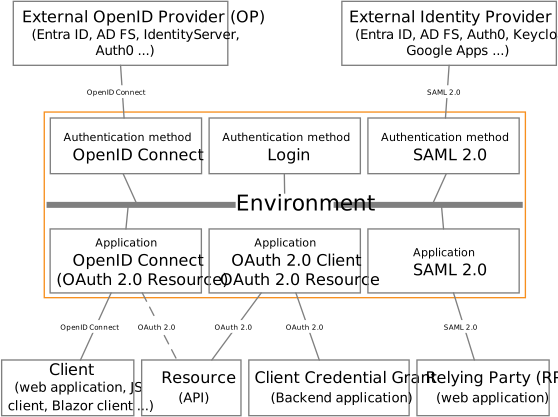
Take a look at the FoxIDs test connections in FoxIDs Control: https://control.foxids.com/test-corp
Get read access with the userreader@foxids.comand passwordgEh#V6kSw
Authentication method types
FoxIDs supports four authentication method types:
- Login and Home Realm Discovery
- OpenID Connect authentication method
- SAML 2.0 authentication method
- External Login - API
For two-factor and multi-factor scenarios, see Two-factor and multi-factor authentication (2FA/MFA).
Authentication method session
Each authentication method creates its own session when a user authenticates. There are two session types:
- Login authentication methods create a user session.
- OpenID Connect and SAML 2.0 authentication methods create an authentication method session that stores the data required to continue the login flow and perform logout.
Both session types support configuring lifetime, absolute lifetime, and persistence.
Connect external identity providers
An external OpenID Provider (OP) or Identity Provider (IdP) can be connected with an OpenID Connect or SAML 2.0 authentication method.
All IdPs supporting either OpenID Connect or SAML 2.0 can be connected to FoxIDs. The following are common integration guides.
OpenID Connect
Configure OpenID Connect to trust an external OpenID Provider.
Always request the
subclaim, even if you only plan to use the
How-to guides:
- Connect IdentityServer
- Connect Microsoft Entra ID
- Connect Azure AD B2C
- Connect Amazon Cognito
- Connect Google
- Connect Facebook
- Connect Signicat
- Connect Nets eID Broker
SAML 2.0
Configure SAML 2.0 to trust an external Identity Provider.
Always request the
NameIDclaim, even if you primarily use the email (http://schemas.xmlsoap.org/ws/2005/05/identity/claims/emailaddress) claim or another custom user ID claim. SAML 2.0 logout requiresNameID.
Prefer metadata-driven configuration so the customer's IdP can automatically download certificate(s). When possible, ask the customer for a live IdP metadata endpoint.
How-to guides:
- Connect Microsoft Entra ID
- Connect PingIdentity / PingOne
- Connect Google Workspace
- Connect Microsoft AD FS
- Connect NemLog-in (Danish IdP)
- Connect Context Handler (Danish identity broker)
Connect FoxIDs environments
FoxIDs environments can be connected in two ways:
- Environment Link for environments in the same tenant.
- OpenID Connect for environments in the same or different tenants.
Environment Link is the fastest and simplest option, but it only works inside one tenant.
OpenID Connect takes more configuration, but it works across tenants and deployments.
Verified platforms
List of customer-verified platforms.
Try the test tenant
FoxIDs cloud is configured with the test tenant test-corp, which contains multiple connected authentication methods.
- Use the online OpenID Connect sample to test login with FoxIDs or a connected external IdP.
- Use the online SAML 2.0 IdP sample to test SAML login, logout, and single logout flows.
- See .NET Samples for the full sample catalogue and local setup details.