Replacing AD FS and changing an application's authentication protocol are separate decisions. An application that already uses WS-Federation may be able to keep that protocol while its trusted identity provider changes to FoxIDs.
The useful first milestone is one application that recognises the same users, grants the intended access and has a tested way back. A successful login alone does not establish any of those outcomes.
This guide is for IAM and solution architects preparing that first migration. It covers a browser-based application using passive WS-Federation, often shortened to WS-Fed. Microsoft 365 domain federation, Windows sign-in and active WS-Trust clients need their own assessment and are outside this example.
Separate the application move from the directory move
AD FS is a federation service; Active Directory is the directory many AD FS installations authenticate against. Moving an application's federation trust does not, by itself, move directory accounts or passwords.
One transition pattern keeps AD FS as the authentication source initially:
| Stage | What the application trusts | Where the user authenticates |
|---|---|---|
| Before | AD FS issues the application's WS-Federation token | AD FS uses its existing authentication configuration |
| First pilot | FoxIDs issues a new WS-Federation token for the application | FoxIDs directs the browser to AD FS through a configured authentication method |
| A later, separate change | The application continues to trust FoxIDs | Another external identity provider, or FoxIDs Login with Directory Connector for AD, replaces AD FS after separate validation |
FoxIDs supports both a WS-Federation application registration facing the application and a WS-Federation authentication method facing AD FS. The two sides have different jobs: one issues tokens; the other validates the upstream provider's response.
In the pilot, AD FS issues a token intended for FoxIDs. FoxIDs validates it and issues a separate token intended for the application. This is not transparent forwarding of the old token: the application must trust FoxIDs' issuer and signing certificate.
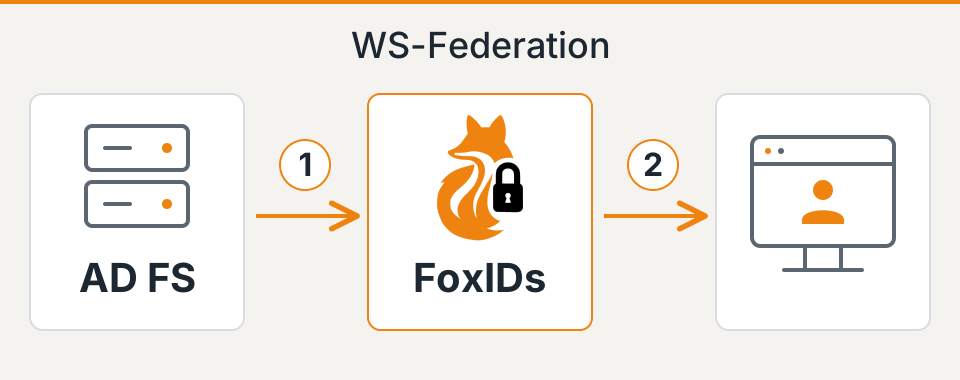
The pilot still depends on AD FS. It creates a controlled point at which the application's trust and claim requirements can be verified, but it does not yet retire the federation service.
Two ways to move beyond AD FS
After the pilot, both of these paths are possible:
- Keep an external identity provider. Replace AD FS with another IdP connected to FoxIDs through a supported authentication method. FoxIDs remains the application's trusted WS-Federation issuer, so the application does not have to adopt the new provider's protocol.
- Use FoxIDs Login with Active Directory. The Directory Connector for Active Directory validates passwords against AD. This removes AD FS from the application's login path while retaining AD as the authoritative directory. The Active Directory modernisation guide explains this architecture.
A later move to FoxIDs password validation is optional. Successful connector sign-ins create or update internal FoxIDs users and, when local password saving is enabled, store a password hash to prepare those users for a later cut-over. This is gradual migration, not an export of every AD account; AD remains authoritative while the connector is enabled.
Whichever path you choose, retest account associations, claims, MFA and logout. The first application pilot below establishes what must be preserved.
Record what the first application actually consumes
Choose an application with an owner, a representative test environment and a configuration you can restore. Confirm that its middleware or vendor supports changing the trusted STS, short for Security Token Service. A configurable metadata URL is useful, but custom issuer checks, account lookup code and authorisation rules also matter.
Consider a fictional expenses application. The table below is an illustrative target contract, not an exported configuration or a report of a completed migration.
| Contract item | Existing behaviour | Required pilot outcome |
|---|---|---|
| Realm / audience | urn:example:expenses identifies the application |
The application's wtrealm matches its FoxIDs registration and the token is intended for that application |
| Reply URL | The test instance receives responses at https://expenses-test.example.org/signin-wsfed |
Only the intended test callback is accepted and used |
| Trusted issuer and signing keys | The application trusts AD FS metadata and signing keys | The test instance trusts the FoxIDs metadata, issuer and signing keys selected for this pilot |
| Token format | The middleware accepts SAML 1.1 carried in WS-Federation | Keep that token format unless a separately tested change is required |
| User lookup | The application's NameIdentifier claim resolves employee E1042 |
The same existing account and history are selected; no second account is created |
| Authorisation | Role ExpenseApprover permits approval |
Approved users retain that permission; users without the role remain unable to approve |
| Session behaviour | The application has a local cookie and a defined logout policy | Login, expiry, fresh authentication and logout meet the agreed policy through the new path |
Use the real application's values and claim types when completing this table. Check whether account lookup also includes the token issuer or external login-provider name: preserving the visible user ID alone may not preserve the account association.
FoxIDs can issue SAML 1.1 or SAML 2.0 tokens through WS-Federation; SAML 1.1 is the default. A SAML 2.0 token inside a WS-Federation response is not a switch to the SAML 2.0 Web SSO protocol. Keep protocol and token-format decisions separate.
Record encryption requirements and certificate expiry alongside signing trust. Encryption and signature validation solve different problems, and support must match the receiving application. For ASP.NET Core, Microsoft's WS-Federation middleware guide identifies MetadataAddress, Wtrealm and the callback configuration as relevant integration settings; check your actual middleware and version before applying a configuration example.
Configure both sides in a test environment
Create the pilot in a separate FoxIDs environment and use an application test instance. Configure the AD FS connection as an authentication method, then register the existing application in FoxIDs with its realm, reply URL, token type and required claims.
On the AD FS side, FoxIDs is a relying party in its own right. Establish that trust using the FoxIDs authentication method's metadata and define the claims and access policy AD FS should apply to it. Keep the original application's AD FS trust available for the agreed rollback window.
Do not assume that the original relying party's claim rules, access restrictions or MFA policy automatically apply to this new trust. AD FS claim rules are associated with individual trust relationships, as described in Microsoft's claim-rule guidance. Recreate the required behaviour at the appropriate point and test it.
Then configure the application test instance to use the FoxIDs STS metadata and expected issuer. Keep issuer, audience and signature validation enabled. Use the endpoints generated for the actual environment rather than adapting an AD FS URL by hand.
The passive browser pilot does not need the separate Microsoft Entra ID Windows sign-in option. That feature supports a different domain-federation and active-client scenario.
Trace the claims through to the application
Metadata establishes endpoints and trust information; it does not establish the application's account and permission behaviour.
With an upstream WS-Federation method, FoxIDs receives SAML claims, represents them internally as JWT claims and converts them back to SAML claims for the application's token. For example, the default mapping converts http://schemas.microsoft.com/ws/2008/06/identity/claims/role to role internally and back to the SAML claim type for WS-Federation. Include the required SAML role claim type in both the upstream Forward claims and downstream Issue claims lists; roles are not included in the default claim set.
Identifiers need a separate check. For a WS-Federation authentication method named adfs, FoxIDs prefixes an incoming identifier E1042 as adfs|E1042 before subsequent claim transforms. If the expenses application expects E1042, define an explicit mapping that preserves the existing account association. Do not remove prefixes indiscriminately: identical identifiers from different sources could otherwise select the same account.
Compare an existing approver with an employee who must not approve expenses. Inspect the claims the application actually consumes, including any middleware mapping, and test the resulting permissions. Claim transforms can change names and values, so verify the final output rather than configuration alone.
Use the claim transform and mapping documentation for implementation details. Forward and issue the claims required by the application; a wildcard is not a substitute for deciding which data it should receive.
Test access and denial before cut-over
Agree expected results with the application owner before testing. Record both the token/claims observed and the application behaviour, using test accounts and keeping authentication material out of shared reports.
| Test | Evidence required before proceeding |
|---|---|
| Existing user signs in | The existing application account, data and history are selected |
| Approver and ordinary employee perform the same action | The approver succeeds; the ordinary employee is denied |
| User is excluded by the old application's access policy | The new path still denies access to that user |
| MFA is required, including with an existing AD FS browser session | The configured flow meets the required assurance; a successful upstream login is not accepted as sufficient evidence by itself |
| User signs out and revisits a protected page | The application cookie, AD FS session and configured logout/cleanup flow meet the agreed logout policy |
| A new authentication attempt requires AD FS while AD FS is unavailable | The attempt fails without bypassing the required authentication source; the failure is visible to the operational owner |
| Test responses contain an invalid issuer, audience or signature | Each invalid response is rejected; validation remains enabled |
| The prior application configuration is restored | A fresh login through the original AD FS path selects the correct account and permissions |
Test session expiry and fresh authentication separately from an ordinary successful login. A disabled account or removed role may still have an existing application session; agree when access must end and verify that timing rather than assuming a new federation configuration revokes every cookie.
FoxIDs supports WS-Federation sign-out and cleanup notifications when configured. Whether every participating application clears its local session depends on its implementation and the actual browser flow. Check logout behaviour with the clients and browsers used in production.
Make cut-over a small, reversible decision
Before production, record who can restore the previous application configuration, where that configuration is held and which findings trigger rollback. Wrong account association, unintended permissions and unmet MFA requirements should stop the rollout immediately. Agree thresholds for login failures and operational incidents rather than inventing them during the change.
Move the agreed application scope during a monitored window. A user-by-user pilot is only possible if the application and routing design support it; otherwise use the test instance first and treat the production application as the unit of change.
Rollback must cover more than the metadata URL. Restore the previous issuer/key trust, claims configuration and any account associations changed during the pilot. Decide how sessions established through the new path will be ended or replaced. Restoring the old endpoint does not undo application data changes or automatically remove those sessions.
Once this application is stable, decide which dependency to remove next. Replacing upstream AD FS, changing the application's protocol to OpenID Connect and migrating directory users are separate follow-on changes, each with its own tests. If user or password storage will change, use the password migration decision guide rather than folding that work into this pilot.
The first application's measured result gives the next migration a concrete starting point: an understood trust configuration, verified user and access behaviour, and a recovery procedure the team has exercised. Use the migration guidance to turn that evidence into the wider plan.