SAML 2.0 application registration
FoxIDs SAML 2.0 application registration enables you to connect a SAML 2.0 based application.
SAML 2.0 is an XML-based authentication and authorization standard that allows secure single sign-on (SSO) between an identity provider (IdP) and a service provider (SP). FoxIDs supports both SP-initiated login and IdP-initiated login.

Your application becomes a SAML 2.0 Relying Party (RP), and FoxIDs acts as a SAML 2.0 Identity Provider (IdP).
FoxIDs supports SAML 2.0 redirect and post bindings.
FoxIDs also forwards a login hint from the SAML Authn request URL using either the login_hint or LoginHint query parameter when the request does not include a NameID. This lets relying parties such as Microsoft Entra ID and Okta pre-fill the user identifier in the FoxIDs login experience.
An application registration exposes SAML 2.0 metadata, allowing your application to discover the SAML 2.0 Identity Provider (IdP).
FoxIDs supports login, logout, and single logout SAML 2.0 profiles. The Artifact profile is not supported.
The FoxIDs generated SAML 2.0 metadata only contains logout and single logout information if logout is configured in the SAML 2.0 application registration.
FoxIDs supports both RSA and ECDSA certificates as SAML signature validation certificates. Signature validation can accept multiple allowed algorithms, which makes it possible to trust relying parties that sign SAML requests with either RSA or ECDSA certificates while keeping legacy RSA-SHA-1 disabled by default.
How-to guides:
- Connect AD FS
- Connect Amazon IAM Identity Center
- Connect Google Workspace
- Connect Microsoft Entra ID
- Connect Context Handler test IdP (Danish identity broker)
Configuration
How to configure your application as a SAML 2.0 Relying Party (RP).
Metadata endpoints
- IdP metadata:
https://foxids.com/tenant-x/environment-y/application-saml-pr1(*)/saml/idpmetadata(replacetenant-x,environment-y, andapplication-saml-pr1with your values). - Alternative single endpoint: the Authn endpoint also returns the IdP metadata when called with
GETand without aSAMLRequest. This allows partners that require one URL for both metadata download and Authn requests to use the same address, for examplehttps://foxids.com/tenant-x/environment-y/application-saml-pr1(*)/saml/authn. When the same endpoint receives a SAML AuthnRequest by redirect or post binding, it performs the normal login flow.
An application registration can support login through multiple authentication methods by adding the authentication method name to the URL.
For example, https://foxids.com/tenant-x/environment-y/application-saml-pr1(login)/saml/idpmetadata or /saml/authn targets the login method. You can also use the default * notation to enable login with all authentication methods.
The following screenshot shows the configuration of a FoxIDs SAML 2.0 application registration in the FoxIDs Control Client. Here the configuration is created from the application's metadata. Issued claims are limited to the configured set of claims, and you can use the * notation to issue all claims.
More configuration options become available by clicking Show advanced.
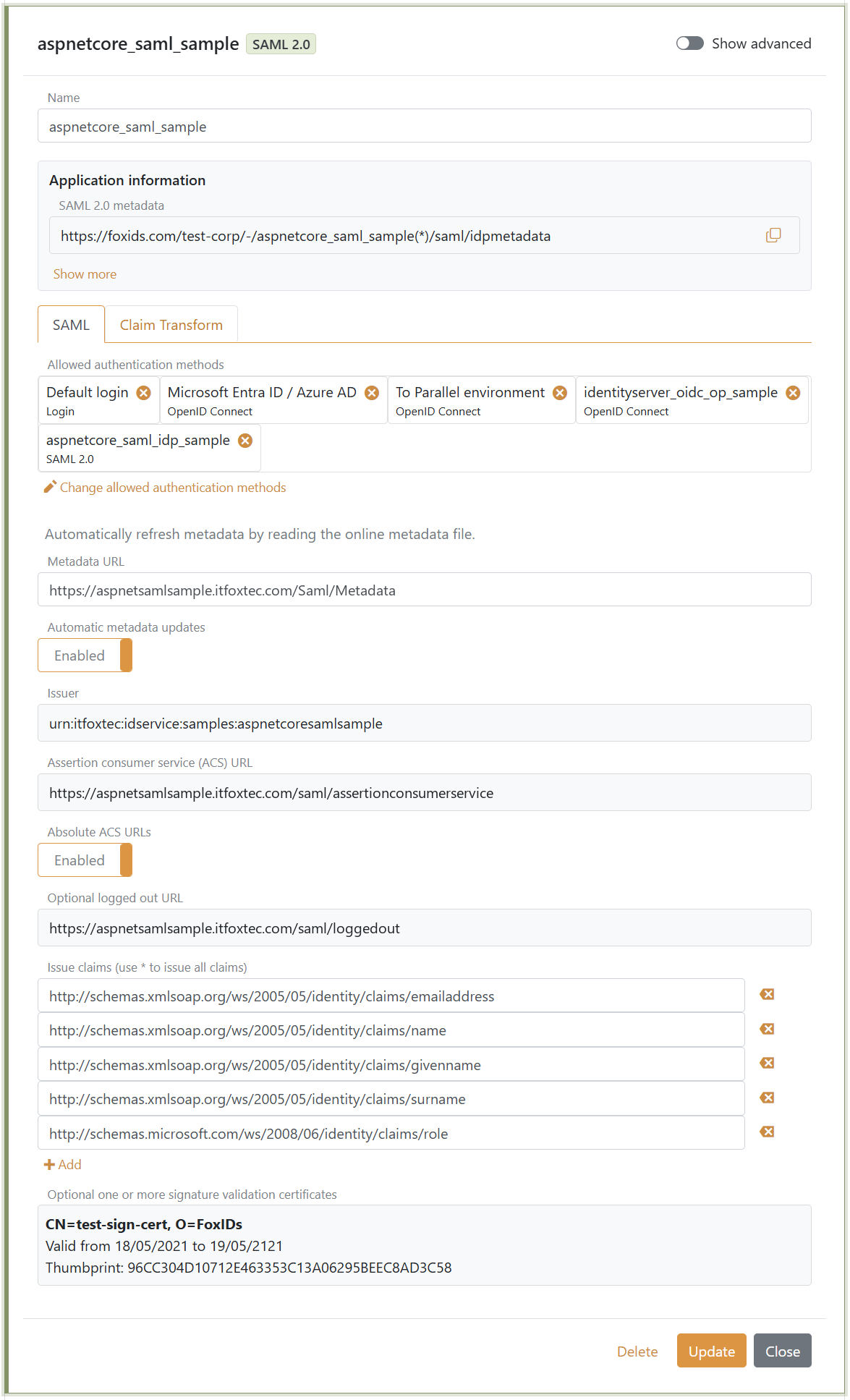
You can change SAML 2.0 claim collection and implement claim tasks with claim transforms and claim tasks. If you create a new claim, add the claim or
*to theIssue claimslist to issue the claim to your application.
Security and interoperability
Advanced SAML security settings are available by clicking Show advanced in the SAML 2.0 application registration.
- Signature algorithm controls the algorithm FoxIDs uses when signing SAML responses or assertions. RSA-SHA-256 is the default.
- Signature validation algorithms is an allowlist for incoming signed SAML requests and logout messages from the relying party. The default allowlist includes the supported RSA-SHA-256/384/512 and ECDSA-SHA-256/384/512 algorithms and excludes RSA-SHA-1.
- SAML signature validation certificates support both RSA and ECDSA certificates, so a relying party can use either certificate type when signing SAML requests and logout messages.
- Encrypt authn response encrypts the assertion in the SAML authentication response. When enabled, upload the relying party encryption certificate and, if required for interoperability, select the data Encryption algorithm and Key encryption algorithm.
Supported data encryption algorithms are AES-128-CBC, AES-192-CBC, AES-256-CBC, AES-128-GCM, AES-192-GCM and AES-256-GCM. AES-256-CBC is the default.
Supported key encryption algorithms are RSA 1.5, RSA-OAEP and XML Encryption 1.1 RSA-OAEP. RSA-OAEP is the default.
Only enable RSA-SHA-1 or RSA 1.5 when required by an older SAML party.
Require multi-factor authentication (MFA)
The SAML 2.0 Relying Party (RP) can require MFA by including urn:foxids:mfa in RequestedAuthnContext.AuthnContextClassRef. You can combine it with more specific values such as urn:foxids:link. See request MFA from applications.
You can find sample code in the AspNetCoreSamlSample and its SamlController.cs file. The AuthnContextClassRef property can be set in the Login method in SamlController.cs:
public IActionResult Login(string returnUrl = null)
{
    var binding = new Saml2RedirectBinding();
    binding.SetRelayStateQuery(new Dictionary<string, string>
    {
        { relayStateReturnUrl, returnUrl ?? Url.Content("~/") }
    });

    var saml2AuthnRequest = new Saml2AuthnRequest(saml2Config)
    {
        // To require MFA
        RequestedAuthnContext = new RequestedAuthnContext
        {
            Comparison = AuthnContextComparisonTypes.Exact,
            AuthnContextClassRef = new string[] { "urn:foxids:mfa" },
        }
    };

    return binding.Bind(saml2AuthnRequest).ToActionResult();
}